<?xml version="1.0" encoding="UTF-8"?><feed
	xmlns="http://www.w3.org/2005/Atom"
	xmlns:thr="http://purl.org/syndication/thread/1.0"
	xml:lang="en-GB"
	>
	<title type="text">Silverback Labs</title>
	<subtitle type="text">Digital Marketing Strategy, Conversion Optimisation, Analytics Insights and Website Design</subtitle>

	<updated>2025-04-06T17:07:51Z</updated>

	<link rel="alternate" type="text/html" href="https://silverbacklabs.net/" />
	<id>https://silverbacklabs.net/feed/atom/</id>
	<link rel="self" type="application/atom+xml" href="https://silverbacklabs.net/feed/atom/" />

	<generator uri="https://wordpress.org/" version="7.1">WordPress</generator>
<icon>https://silverbacklabs.net/wp-content/uploads/2017/09/cropped-sbl-2-32x32.jpg</icon>
	<entry>
		<author>
			<name>Killian</name>
							<uri>https://silverbacklabs.net/</uri>
						</author>

		<title type="html"><![CDATA[GA4 Difficulties: GA4 Breaks Hearts and Marketing Attribution Reports]]></title>
		<link rel="alternate" type="text/html" href="https://silverbacklabs.net/google-analytics/ga4-difficulties-ga4-breaks-hearts-and-marketing-attribution-reports/" />

		<id>https://silverbacklabs.net/?p=7369</id>
		<updated>2025-04-06T17:07:51Z</updated>
		<published>2025-04-06T16:57:07Z</published>
		<category scheme="https://silverbacklabs.net/" term="Google Analytics" /><category scheme="https://silverbacklabs.net/" term="cookieless tracking" /><category scheme="https://silverbacklabs.net/" term="enhanced conversions" /><category scheme="https://silverbacklabs.net/" term="google ads" />
		<summary type="html"><![CDATA[<p>The post <a href="https://silverbacklabs.net/google-analytics/ga4-difficulties-ga4-breaks-hearts-and-marketing-attribution-reports/">GA4 Difficulties: GA4 Breaks Hearts and Marketing Attribution Reports</a> appeared first on <a href="https://silverbacklabs.net">Silverback Labs</a>.</p>
]]></summary>

					<content type="html" xml:base="https://silverbacklabs.net/google-analytics/ga4-difficulties-ga4-breaks-hearts-and-marketing-attribution-reports/"><![CDATA[<div class="et_pb_section et_pb_section_0 et_section_regular" >


				<div class="et_pb_row et_pb_row_0">
				<div class="et_pb_column et_pb_column_4_4 et_pb_column_0  et_pb_css_mix_blend_mode_passthrough et-last-child">


				<div class="et_pb_module et_pb_text et_pb_text_0  et_pb_text_align_left et_pb_bg_layout_light">


				<div class="et_pb_text_inner"><h2>Executive Summary // TL;DR</h2>
<ul>
<li><a href="https://support.google.com/analytics/answer/10089681?hl=en" target="_blank" rel="noopener"><strong>GA4</strong></a> is good, it is <strong>a step forward</strong> in web analytics from UA.</li>
<li><strong>Google is bias</strong> and doesn&#8217;t always advise on what is best.</li>
<li><strong>Auditing, implementing and optimising GA4</strong> as a bespoke configuration for your site is as <strong>necessary</strong> for GA4 as it was for UA. Don&#8217;t assume it will work effectively out of the box.</li>
<li>Don&#8217;t embrace black box algorithms, then complain that GA4 is confusing. You&#8217;re just embracing the confusion and then suffering the consequences. AI has become a buzzword just like &#8216;server side&#8217; did. Server side is an add-on to an already robust implementation and AI is a tool most effective in the hands of someone already proficient in what they&#8217;re asking of the AI.</li>
<li>In my opinion, <strong>black box anything is a red flag</strong>. If, as a marketing analyst, you cannot understand or explain the attribution model, then its not a suitable attribution model.</li>
<li>I have observed a <strong>40%+ desrcepency when switching between Data Driven and Last Click attribution models</strong>.</li>
<li><strong>Switch the default attribution model from Data Driven back to Last Click</strong>. Ironically, <strong>it&#8217;s the the most reliable attribution model</strong> &#8211; at least you can be sure of the bottom of the funnel drivers and avoid Googles greedy PPC attribution &#8230;and data comparisons between platforms begin to show parity again.</li>
<li><strong>Set reporting identity to Observed</strong> if comparisons and attribution reports are still off. <strong>Minimise the impacts of <a href="https://developers.google.com/tag-platform/security/guides/consent?consentmode=advanced#upgrade-consent-v2" target="_blank" rel="noopener">Consent Mode v2</a> and avoid Modelled/Estimated data</strong>. Do this especially if you&#8217;re working with BigQuery data and wanting to minimise discrepancies between GA4 and BQ.</li>
<li>GA4 UI uses an algorithm called <a href="https://developers.google.com/analytics/blog/2022/hll" target="_blank" rel="noopener"><strong>HyperLogLog++</strong></a> to query and present data fast. Querying is expensive and GA4 is free. This is a cost saving measure. So the data served is an estimation. Google documentation states a 2% discrepancy between GA4 and BigQuery.</li>
<li><strong>Request Unsampled reports &#8211; ALWAYS</strong>. When you continue to run into sampling and cardinality issues opt for BigQuery data.</li>
<li>Want more accurate data? <strong>Use <a href="https://cloud.google.com/bigquery" target="_blank" rel="noopener">BigQuery</a> data where possible</strong>. It was previously only available to 360 customers now standard GA4 users have access to an enterprise level data warehouse. It is still out of reach (yet accessible) to entry and mid level users.</li>
<li>Struggling with BigQuery data? <strong>If your business is at a certain level don&#8217;t be afraid to invest in <a href="https://silverbacklabs.net/" target="_blank" rel="noopener">data engineering services</a></strong>. Storage is inexpensive, querying can quickly get very expensive. <strong>Out of the box GA4&gt;BQ isn&#8217;t really usable for reporting</strong>, only for data verification. Be prepared to invest in 20+ hours of data engineering to set up ETL processes, fact and dim tables, (then daily querying gets expensive).</li>
</ul>
<h3> </h3>
<h2>Introduction</h2>
<p><strong>GA4 breaks hearts and marketing attribution reports.</strong></p>
<p>The platform has received emphatically negative criticism.</p>
<p>It&#8217;s not without problems and there hasn&#8217;t been a seamless migration path (the migration propaganda was a joke). You couldn&#8217;t just walk from one platform to the next and that upset a lot of people who just wanted to stay on the UA boat.</p>
<p><strong>It&#8217;s clear that <a href="https://support.google.com/analytics/answer/2790010?hl=en" target="_blank" rel="noopener">UA</a> and <a href="https://support.google.com/analytics/answer/11583528?hl=en" target="_blank" rel="noopener">GA4</a> are significantly different.</strong></p>
<p>The data model and schema is different, the dataLayer syntax is different, the UI is very different, all hit types reduced only to events, scopes initially reduced to only hit and user level. Filtering is limited, misleading configuration elements introduced and combined with advanced consent mode enforcement &#8211; modelled data that can&#8217;t be segmented from observed data.</p>
<p><strong>&#8230;but the fundamentals of data analytics and data collection are still the same.</strong></p>
<ol>
<li>The database still consists of facts and dimensions</li>
<li>The majority of dimensions and metrics are the same or have equivalents</li>
<li>The platform is still free for standard users</li>
<li>Explorations offers massive improvements for custom report building</li>
</ol>
<p>GA4 isn&#8217;t going anywhere and jaded users looking for alternatives are quickly dissuaded when comparing pricing models &#8211; <strong>GA4: free vs mid tier analytics platform for £1000&#8217;s/per month</strong>. They quickly scurry back to <a href="https://support.google.com/analytics/answer/10089681?hl=en" target="_blank" rel="noopener"><strong>GA4</strong></a>.</p>
<p>For enterprise level, many suitable alternatives already dominate the marketplace such as <a href="https://business.adobe.com/uk/products/adobe-analytics.html" target="_blank" rel="noopener"><strong>Adobe Analytics</strong></a> and <a href="https://snowplow.io/" target="_blank" rel="noopener"><strong>Snowplow</strong></a>.</p>
<p>One thing to understand is <a href="https://marketingplatform.google.com/intl/en_uk/about/analytics/" target="_blank" rel="noopener"><strong>Google Analytics</strong></a> was built to support <a href="https://business.google.com/uk/google-ads/" target="_blank" rel="noopener"><strong>Google Ads</strong></a>, <strong><a href="https://google.com/" target="_blank" rel="noopener">Google&#8217;s</a> </strong>main revenue stream. An important perspective to consider when assessing some of GA4&#8217;s new &#8216;<a href="https://support.google.com/google-ads/answer/6394265?hl=en-GB" target="_blank" rel="noopener"><strong>features</strong></a>&#8216; and also why GA4 will always be important to sites with an ad spend.</p>
<h3> </h3>
<h2>The story so far</h2>
<p>Simplicity has always been Googles trademark, but Google Analytics was lagging behind enterprise level competitors. The update was <strong>necessary, desirable and is a step forward</strong>.</p>
<p>Universal Analytics launched in 2005 and ran as the leading analytics platform on the internet (for free) for 17.66 years until the doomsday sunset in July 2023. Thats nearly <strong>18 years with no significant overhaul in code design</strong>.</p>
<p>18 years in internet years is more like 180 years.</p>
<p>The ever evolving and fast paced landscape of web to web 2.0 to web 3.0 to next.js, single page apps, developments in ecommerce tech, booking engines and gaming apps meant a new platform was necessary rather than updating UA.</p>
<h3> </h3>
<h2>Differences and Similarities: UA data vs GA4</h2>
<p>There is a lot of familiarity between UA and GA4 and if you were proficient with UA, it shouldn&#8217;t take much to understand GA4, it&#8217;s still a dimensional model based on fact and dim tables.</p>
<p>However, <a href="https://support.google.com/analytics/answer/11986666?hl=en#sessions&amp;zippy=%2Cin-this-article" target="_blank" rel="noopener"><strong>some metrics are calculated differently</strong></a>.</p>
<p>Aside from having to get used to a new platform, there was a lot of struggle with year on year reporting after switching to GA4. There are a few things to consider when doing cross platform YoY analytics.</p>
<ul>
<li>Enabling the &#8216;Observed&#8217; Reporting Identity to exclude estimated/modelled data from GA4, as there is no modelled data in UA and these un-consented sessions are not presented and avoid sampling and condensed (GA4s way of eliminating cardinality issues) reports.</li>
<li>HLL++ is used for Users and Sessions only, not any other metrics</li>
<li>Sessions are defined differently not resetting at midnight, or when new UTM parameters are used<br />this also affects last-click attribution numbers if you&#8217;re comparing these</li>
<li>Engagement/bouncing is defined differently</li>
<li>Depending when/if they implemented their cookie banner, you could be only collecting some data and comparing it to all data (not just a GA4/UA thing, but worth considering)</li>
<li>If looking at marketing channels, GA4 has different default channel grouping definitions AND a different attribution model unless set to match UA e.g. Data Driven vs Last Click<br />&#8216;Users&#8217; in GA4 is actually Active Users, not Total Users, whereas it is Total Users in UA.</li>
</ul>
<h3> </h3>
<h2>Where to start</h2>
<p>If you or your team are struggling with the data, then start with implementation basics. If it was an out of the box set up, then start with confgurations. Did you use the dreadful automated migration tool? Auditing, Implementing and Optimising are still fundamental just as they were with UA. Misconfigurations in GA4 are more common than UA.</p>
<p>Aside from misconfigurations and implementation errors, I have observed a lack of consistent reporting methodologies across teams because standard / pre-built reports are inadequate. GA4 appears to usher users to Explorations and custom report building, but this leaves too many possiblitites for inconsistent report building.</p>
<p>I recommend standising reporting by building templates in explorations and dashboards in your data visualisation tool of choice.</p>
<p>There are sometimes issues that temporarily impact the generation of daily aggregated tables. When this happens, Google serve from intraday tables instead. Unfortunately, these tables have a limited TTL (Time To Live &#8211; a mechanism that limits the lifespan or lifetime of data, preventing packets from circulating indefinitely and improving network performance and caching efficienc) and so, after a while, the data disappears or is inconsistant between different report configurations.</p>
<p>Silver lining: BigQuery export does not rely on aggregated tables and is unimpacted. Granular data stores (e.g. much of the explore module, particularly when using segments) are unimpacted.</p>
<p>Is GA4 un-usable? Nope, not at all, but to really utilise the tool it requires skillsets outside of most marketers ability and the support of a full data team of analysts, BI and data engeering support is out of reach for many small to medium businesses.</p>
<h3> </h3>
<h2>Typical Issues</h2>
<p>Some issue I have repeatedly faced while working with troublesome GA4 implementations are outlined below.</p>
<h3> </h3>
<h3>Real Time Reporting and Data Freshness</h3>
<p><b>GA4 allows for a data processing delay of 24-48 hours, depending on the data limits per property</b>. A normal property&#8217;s standard intraday processing time is 4 – 8 hours. During peak times, when a property is processing 250 billion or more events, processing time may take up to two days.</p>
<p>If real time reporting is a necessity then I recommend setting up <a href="https://newrelic.com/" target="_blank" rel="noopener"><strong>New Relic</strong></a> and creating real time dashboards. Its really a full stack monitoring tool, but they have a free tier with at least 8 days data retention.</p>
<h3> </h3>
<h3>Occurance of (not set)</h3>
<p>(not set) indicates that no data was collected for the parameter at the time the event triggered.</p>
<p>Causes vary depending on where (not set) appears.</p>
<h5>Landing Page Reports</h5>
<p>When you get (not set) in Landing Page reports, the session didn&#8217;t have any page_view events (and hence no landing page). Its usually an orphan session that starts with an event that triggers (add_to_cart, scroll) without a page_view in the second session. i.e. Second session occurs because the first session expired, then the user does something to trigger an event that starts a second session, and then they leave.</p>
<p>It could also happen with consent when the page_view doesn&#8217;t trigger because the user hasn&#8217;t given consent, then they do but the page_view isn&#8217;t sent after the consent is updated.</p>
<h5>Attribution reports</h5>
<p>There have been several bugs affecting spikes in (not set) in Attribution reports mostly caused by Advanced Consent Mode v2. The GA team are aware and work on these issues when the pop up. This errounous traffic can be identified if you get traffic in the Unassigned Channel with a source / medium of (not set) / (not set). Typical if there is traffic with no referrer and no source / medium it should be in the Direct Channel, not Unassigned.</p>
<p>Another cause is blocking data collection until the second pageview when utm parameters are no longer in the URL. To reduce this investigate and optimise the GDPR/consent implementation to ensure optimal data collection.</p>
<h3> </h3>
<h3>Issues with SPA&#8217;s</h3>
<p>Tracking Single Page Apps with GA4 comes with its own set of issues. A few of the the most notorious ones are:</p>
<p>Page path logged in the browser doesnt always match URL path. The browser doesnt always update with soft transitions and so page variables such as page_location and page_title should be set in the dataLayer from and GA4&#8217;s default browser collected variables over ridden via GTM configurations.</p>
<p>Duplicate pageviews are a common issue because of pageviews being recorded on browser URL history changes as well as pageview events.</p>
<h3> </h3>
<h3>Google Tag</h3>
<p>The Google Tag is a piece of code that sends data from a website to linked Google product destination (Google Ads, GA4, or CM360). The Google tag simplifies the process of tracking and measuring the performance.</p>
<p>It is a central hub for sending data, making it easier to track user interactions, conversions, and other important metrics across different Google products.</p>
<p>Settings can conflict with other in-platform settings. A few issues I have frequently come across are:</p>
<p>Duplicate settings &#8211; There are a duplicate set of the same enhanced measurement settings in the Google Tag and the the GA4 UI. Set both.</p>
<p>Duplicate pageviews (and SPA pageview) &#8211; Auto enabling the SPA pageview setting to record page views on browser URL changes is often the cause of undedected duplicate pageviews.</p>
<p>Duplicate events &#8211; There is a setting to de-duplicate events that is off by default.</p>
<h3> </h3>
<h3>Google Tag Inheritance Model</h3>
<p>The inheritance model the Google Tag uses has been the culprit of many unexplained tracking errors and isn&#8217;t talked about anywhere. Avoid relying on the inheritance model and shared event settings. Don&#8217;t be lazy in implementation.</p>
<p>Shared event settings vaiables call on a snapshot of data recorded from when the Google Tag loads. To reduce (not set) and ensure optimal data collection record fresh data for each event call.</p>
<h3> </h3>
<h3>Report Building</h3>
<p>This is really a user error. Reports can be configured in multiple ways and different team members use slightly different configurations and resulting in imcomparible data.</p>
<h3> </h3>
<h3>Data Latency</h3>
<p>There is a 48 hour latency period that severally affects data processing and load into the platform UI. Don&#8217;t bother looking at reports that include the most recent 48 hours of data e.g. last 30 days.</p>
<h3> </h3>
<h3>Explorations</h3>
<h4>Limits of Explorations</h4>
<p>Explorations is subject to the following limits:</p>
<ul>
<li>You can create up to 200 individual explorations per user per property.</li>
<li>You can create up to 500 shared explorations per property.</li>
<li>You can apply up to 10 segments per exploration.</li>
<li>You can apply up to 10 filters per tab.</li>
</ul>
<h4>Sampling and data thresholds</h4>
<p>You can use Explorations to quickly perform custom queries on large amounts of data. However, your explorations may be based on sampled data if more than 10 million events are part of a particular exploration query.</p>
<p>To protect user privacy, Explorations and Reports are subject to data thresholds. If your exploration includes demographic information or data provided by Google signals, the data may be filtered to remove data that might identify individual users.</p>
<p>When an exploration is subject to either sampling or data thresholds, the icon in the right corner of the exploration changes from green to yellow. A tooltip displays information about the data in the exploration.</p>
<h4>Incompatible request</h4>
<p>If your exploration contains an incompatible combination of dimensions, metrics or both you will see the incompatible request icon asking that you update the request.</p>
<h4>Condensed datasets</h4>
<p>You can use Explorations to quickly perform custom queries on large amounts of data. However, your explorations may be based on sampled data if more than 10 million events are part of a particular exploration query.</p>
<p>To protect user privacy, Explorations and Reports are subject to <a href="https://support.google.com/analytics/answer/9383630">data thresholds</a>. If your exploration includes demographic information or data provided by Google signals, the data may be filtered to remove data that might identify individual users.</p>
<p>When an exploration is subject to either sampling or data thresholds, the icon in the right corner of the exploration changes from green to yellow. A tooltip displays information about the data in the exploration.</p>
<h4>Estimated/Modelled data</h4>
<p>&nbsp;</p>
<h3> </h3>
<h3>Reporting Identity</h3>
<p>Blended vs Observed data</p>
<h3> </h3>
<h3>Consent Mode</h3>
<p>Basic Consent Mode<br />Advanced Consent Mode</p>
<p>This article says after analytics storage consent is denied, UA will not store any subsequent hits.<br />100 =<br />1 (do nothing)<br />first 0: ads storage denied<br />second 0: analytics storage denied<br />So that means UA should align with GA4 when set to Observed/modelled data is excluded</p>
<p>&nbsp;</p>
<h3>Attribution Model</h3>
<p>Data driven probably with a bias towards Google Ads attribution as ultimately blah blah</p>
<p>GA4&#8217;s DDA model is a black box so we have no idea how it attributes, and I already speculated that its another attempt from Google to sway bias towards Paid Search (where they generate revenue).</p>
<p>But bottom line is we cannot explain why DDA attributes 20% more conversions to Email than Last Click, we don&#8217;t know how it weighted the attribution source. Thats a red flag to me, so I would prefer to avoid it.</p>
<p>Ironically, last click is the most reliable attribution model (you can at least be sure of the bottom-funnel drivers). Trying to rely on any other type of MTA (data-driven, modeled, or otherwise) is a fools errand, imo. First click has its valid uses too.</p>
<p>BigQuery export schema doesnt included calculated metrics or attribution models. You can build your own attribution model but cannot replicate data driven. MTA vs MMM</p>
<p>DDA blackbox cant be explained. Doesnt seem very data driven if you dont understand the data. Any model that you can explain to a marketing manager is valid. If you can´t explain it (datadriven blackbox), avoid it.</p>
<p>&nbsp;</p>
<h3>Differences in GA4 vs BQ</h3>
<p>Algorhhythm &#8211; HyperLogLog++ 2%</p>
<p>&nbsp;</p>
<h3>BigQuery</h3>
<p>Why its essential<br />Storgae Costs<br />Querying Costs<br />ETL processes<br />Building a Data Model / DBT<br />Report Buidling<br />Fresh Daily<br />Streaming<br />SLA</p>
<p>We understand that the BigQuery Export SLA has been a highly awaited feature for you in GA4. To support this feature, our product team has built an entirely new export option called the BigQuery Fresh Daily Export (360 feature only). This new export type is notably faster than existing export options, allowing you to receive your data reliably by a similar time each day.</p>
<p>We understand that getting the BigQuery export quickly and at a reliable time has been a top ask to support your migration to GA4. As a result, we launched this export to Open Beta in Q4 ‘23.</p>
<p>Our next step is to introduce an official SLA to this export type, a net-new feature in GA4. The SLA will guarantee export completeness by the same time in the morning each day. The launch date for the SLA must come after a period of validation on the new export type to ensure the product can meet the standards set by the SLA. The launch date for the SLA is now targeted for Q2 ‘24.</p>
<p>Please note that this continues to be a top priority item for our product team. We understand the importance of the SLA and appreciate your patience as the team continues to work through this.</p>
<h3> </h3>
<h3>Tools to Supplement a GA4 Implementation</h3>
<p>New Relic</p>
<p>sGTM</p>
<p>Funnel.io</p>
<p>Big Query</p>
<p>Looker Studio</p>
<p>Looker BI</p>
<p>PowerBI</p>
<p>Tableau</p>
<h3> </h3>
<h3>GA4 Alternatives</h3>
<h4>Enterprise Level:</h4>
<ul>
<li><a href="https://business.adobe.com/uk/products/adobe-analytics.html" target="_blank" rel="noopener">Adobe Analytics</a></li>
<li><a href="https://snowplow.io/" target="_blank" rel="noopener">Snowplow</a></li>
</ul>
<h4>Mid-tier:</h4>
<ul>
<li><a href="https://plausible.io/" target="_blank" rel="noopener">Plausable Analytics</a></li>
<li><a href="https://www.voidanalytics.com/" target="_blank" rel="noopener">Void Analytics</a></li>
<li><a href="https://matomo.org/" target="_blank" rel="noopener">Matomo</a></li>
<li><a href="https://mixpanel.com/" target="_blank" rel="noopener">MixPanel</a></li>
</ul>
<p>&nbsp;</p>
<h3>References</h3>
<p><strong>[UA→GA4] Comparing metrics: Google Analytics 4 vs. Universal Analytics</strong><br /><a href="https://support.google.com/analytics/answer/11986666?hl=en#sessions&amp;zippy=%2Cin-this-article" target="_blank" rel="noopener">https://support.google.com/analytics/answer/11986666?hl=en#sessions&amp;zippy=%2Cin-this-article</a></p>
<p><strong>What&#8217;s new in Google Analytics: Releases &#8211; June 10, 2024</strong><br /><a href="https://support.google.com/analytics/answer/9164320?hl=en#061024" target="_blank" rel="noopener">https://support.google.com/analytics/answer/9164320?hl=en#061024</a></p>
<p><strong>How Consent Mode Affects the Way Google Analytics Records Data</strong><br /><a href="https://adswerve.com/blog/how-consent-mode-affects-the-way-google-analytics-records-data" target="_blank" rel="noopener">https://adswerve.com/blog/how-consent-mode-affects-the-way-google-analytics-records-data</a></p>
<p><strong>Google Fixes GA4 Attribution Models To Better Associate Conversions To Paid Search</strong><br /><a href="https://www.seroundtable.com/google-ga4-attribution-update-paid-37562.html" target="_blank" rel="noopener">https://www.seroundtable.com/google-ga4-attribution-update-paid-37562.html</a></p>
<p><strong>DBT-GA4 Setup (On Demand)</strong><br /><a href="https://caretjuice.com/courses/dbt-ga4-setup/" target="_blank" rel="noopener">https://caretjuice.com/courses/dbt-ga4-setup/</a></p>
<p><strong>Intro to DBT-GA4</strong><br /><a href="https://caretjuice.com/courses/intro-to-dbt-ga4/" target="_blank" rel="noopener">https://caretjuice.com/courses/intro-to-dbt-ga4/</a></p>
<p><strong>Advanced dbt-GA4 (On-Demand)</strong><br /><a href="https://caretjuice.com/courses/advanced-dbt-ga4/" target="_blank" rel="noopener">https://caretjuice.com/courses/advanced-dbt-ga4/</a></p>
<p><strong>Multi-touch attribution vs. marketing mix modeling</strong><br /><a href="https://funnel.io/blog/mta-vs-mmm" target="_blank" rel="noopener">https://funnel.io/blog/mta-vs-mmm</a></p>
<p><strong>How data is stored and displayed</strong><br /><strong>[GA4] Understand how Analytics stores and displays data</strong><br /><a href="https://support.google.com/analytics/answer/13888627?hl=en&amp;sjid=11679720983765570458-EU&amp;visit_id=638550799908046877-2362061252&amp;ref_topic=13987797&amp;rd=1" target="_blank" rel="noopener">https://support.google.com/analytics/answer/13888627?hl=en&amp;sjid=11679720983765570458-EU&amp;visit_id=638550799908046877-2362061252&amp;ref_topic=13987797&amp;rd=1</a></p>
<p><strong>How data is stored and displayed</strong><br /><strong>[GA4] About the (other) row</strong><br /><a href="https://support.google.com/analytics/answer/13331684?hl=en&amp;ref_topic=13987797&amp;sjid=11679720983765570458-EU" target="_blank" rel="noopener">https://support.google.com/analytics/answer/13331684?hl=en&amp;ref_topic=13987797&amp;sjid=11679720983765570458-EU</a></p>
<p><strong>How data is stored and displayed</strong><br /><strong>[GA4] About data sampling</strong><br /><a href="https://support.google.com/analytics/answer/13331292?hl=en&amp;ref_topic=13987797&amp;sjid=11679720983765570458-EU" target="_blank" rel="noopener">https://support.google.com/analytics/answer/13331292?hl=en&amp;ref_topic=13987797&amp;sjid=11679720983765570458-EU</a></p>
<p><strong>How data is stored and displayed</strong><br /><strong>[GA4] Automatic expanded data sets for Google Analytics 360</strong><br /><a href="https://support.google.com/analytics/answer/11295588?hl=en&amp;ref_topic=13987797&amp;sjid=11679720983765570458-EU" target="_blank" rel="noopener">https://support.google.com/analytics/answer/11295588?hl=en&amp;ref_topic=13987797&amp;sjid=11679720983765570458-EU</a></p>
<p><strong>How data is stored and displayed</strong><br /><strong>[GA4] Expanded data sets for Google Analytics 360</strong><br /><a href="https://support.google.com/analytics/answer/12867885?hl=en&amp;ref_topic=13987797&amp;sjid=11679720983765570458-EU#zippy=%2Cin-this-article" target="_blank" rel="noopener">https://support.google.com/analytics/answer/12867885?hl=en&amp;ref_topic=13987797&amp;sjid=11679720983765570458-EU#zippy=%2Cin-this-article</a></p>
<p><strong>How data is stored and displayed</strong><br /><strong>[GA4] Unsampled explorations for Google Analytics 360</strong><br /><a href="https://support.google.com/analytics/answer/10896953?hl=en&amp;ref_topic=13987797&amp;sjid=11679720983765570458-EU#zippy=%2Cin-this-article" target="_blank" rel="noopener">https://support.google.com/analytics/answer/10896953?hl=en&amp;ref_topic=13987797&amp;sjid=11679720983765570458-EU#zippy=%2Cin-this-article</a></p>
<p><strong>How data is stored and displayed</strong><br /><strong>[GA4] Adjust sampling for Google Analytics 360</strong><br /><a href="https://support.google.com/analytics/answer/13987905?hl=en&amp;ref_topic=13987797&amp;sjid=11679720983765570458-EU" target="_blank" rel="noopener">https://support.google.com/analytics/answer/13987905?hl=en&amp;ref_topic=13987797&amp;sjid=11679720983765570458-EU</a></p>
<p><strong>[GA4] Reporting identity</strong><br /><strong>Learn how Google Analytics measures users across devices and platforms.</strong><br /><a href="https://support.google.com/analytics/answer/10976610?hl=en&amp;ref_topic=12153537,12153943,2986333,&amp;sjid=11679720983765570458-EU&amp;visit_id=638550799908046877-2362061252&amp;rd=1" target="_blank" rel="noopener">https://support.google.com/analytics/answer/10976610?hl=en&amp;ref_topic=12153537,12153943,2986333,&amp;sjid=11679720983765570458-EU&amp;visit_id=638550799908046877-2362061252&amp;rd=1</a></p>
<p><strong>[GA4] Data freshness</strong><br /><a href="https://support.google.com/analytics/answer/11198161?hl=en&amp;ref_topic=12153537,12153943,2986333,&amp;sjid=11679720983765570458-EU&amp;visit_id=638550799908046877-2362061252&amp;rd=1" target="_blank" rel="noopener">https://support.google.com/analytics/answer/11198161?hl=en&amp;ref_topic=12153537,12153943,2986333,&amp;sjid=11679720983765570458-EU&amp;visit_id=638550799908046877-2362061252&amp;rd=1</a></p>
<p><strong>Limits of Explorations</strong><br /><a href="https://support.google.com/analytics/answer/7579450?hl=en&amp;ref_topic=12153537,12153943,2986333,&amp;sjid=11679720983765570458-EU&amp;visit_id=638550799908046877-2362061252&amp;rd=1#limits-of-analysis&amp;zippy=%2Cin-this-article" target="_blank" rel="noopener">https://support.google.com/analytics/answer/7579450?hl=en&amp;ref_topic=12153537,12153943,2986333,&amp;sjid=11679720983765570458-EU&amp;visit_id=638550799908046877-2362061252&amp;rd=1#limits-of-analysis&amp;zippy=%2Cin-this-article</a></p>
<p><strong>[GA4] BigQuery Export schema</strong><br /><a href="https://support.google.com/analytics/answer/7029846?hl=en&amp;ref_topic=9359001&amp;sjid=11679720983765570458-EU#event&amp;user&amp;device&amp;geo&amp;app_info&amp;collected_traffic_source&amp;traffic_source&amp;stream&amp;ecommerce&amp;items" target="_blank" rel="noopener">https://support.google.com/analytics/answer/7029846?hl=en&amp;ref_topic=9359001&amp;sjid=11679720983765570458-EU#event&amp;user&amp;device&amp;geo&amp;app_info&amp;collected_traffic_source&amp;traffic_source&amp;stream&amp;ecommerce&amp;items</a></p></div>
			</div>
			</div>


			</div><div class="et_pb_row et_pb_row_1">
				<div class="et_pb_column et_pb_column_4_4 et_pb_column_1  et_pb_css_mix_blend_mode_passthrough et-last-child">


				<div class="et_pb_module et_pb_post_nav_0 et_pb_posts_nav nav-single">
								<span class="nav-previous"
									>
					<a href="https://silverbacklabs.net/google-tag-manager/google-ads-enhanced-conversions/" rel="prev">
												<span class="meta-nav">&larr; </span><span class="nav-label">Google Ads Enhanced Conversions</span>
					</a>
				</span>
			
			</div>
			</div>


			</div>
				
				
			</div>
<p>The post <a href="https://silverbacklabs.net/google-analytics/ga4-difficulties-ga4-breaks-hearts-and-marketing-attribution-reports/">GA4 Difficulties: GA4 Breaks Hearts and Marketing Attribution Reports</a> appeared first on <a href="https://silverbacklabs.net">Silverback Labs</a>.</p>
]]></content>
		
					<link rel="replies" type="text/html" href="https://silverbacklabs.net/google-analytics/ga4-difficulties-ga4-breaks-hearts-and-marketing-attribution-reports/#comments" thr:count="0" />
			<link rel="replies" type="application/atom+xml" href="https://silverbacklabs.net/google-analytics/ga4-difficulties-ga4-breaks-hearts-and-marketing-attribution-reports/feed/atom/" thr:count="0" />
			<thr:total>0</thr:total>
			</entry>
		<entry>
		<author>
			<name>Killian</name>
							<uri>https://silverbacklabs.net/</uri>
						</author>

		<title type="html"><![CDATA[Google Ads Enhanced Conversions]]></title>
		<link rel="alternate" type="text/html" href="https://silverbacklabs.net/google-tag-manager/google-ads-enhanced-conversions/" />

		<id>https://silverbacklabs.net/?p=7275</id>
		<updated>2022-09-17T09:32:42Z</updated>
		<published>2022-05-16T09:43:32Z</published>
		<category scheme="https://silverbacklabs.net/" term="Conversion Optimisation" /><category scheme="https://silverbacklabs.net/" term="Ecommerce" /><category scheme="https://silverbacklabs.net/" term="Google Tag Manager" /><category scheme="https://silverbacklabs.net/" term="cookieless tracking" /><category scheme="https://silverbacklabs.net/" term="enhanced conversions" /><category scheme="https://silverbacklabs.net/" term="google ads" />
		<summary type="html"><![CDATA[<p>The post <a href="https://silverbacklabs.net/google-tag-manager/google-ads-enhanced-conversions/">Google Ads Enhanced Conversions</a> appeared first on <a href="https://silverbacklabs.net">Silverback Labs</a>.</p>
]]></summary>

					<content type="html" xml:base="https://silverbacklabs.net/google-tag-manager/google-ads-enhanced-conversions/"><![CDATA[<div class="et_pb_section et_pb_section_1 et_section_regular" >


				<div class="et_pb_row et_pb_row_2">
				<div class="et_pb_column et_pb_column_4_4 et_pb_column_2  et_pb_css_mix_blend_mode_passthrough et-last-child">


				<div class="et_pb_module et_pb_text et_pb_text_1  et_pb_text_align_left et_pb_bg_layout_light">


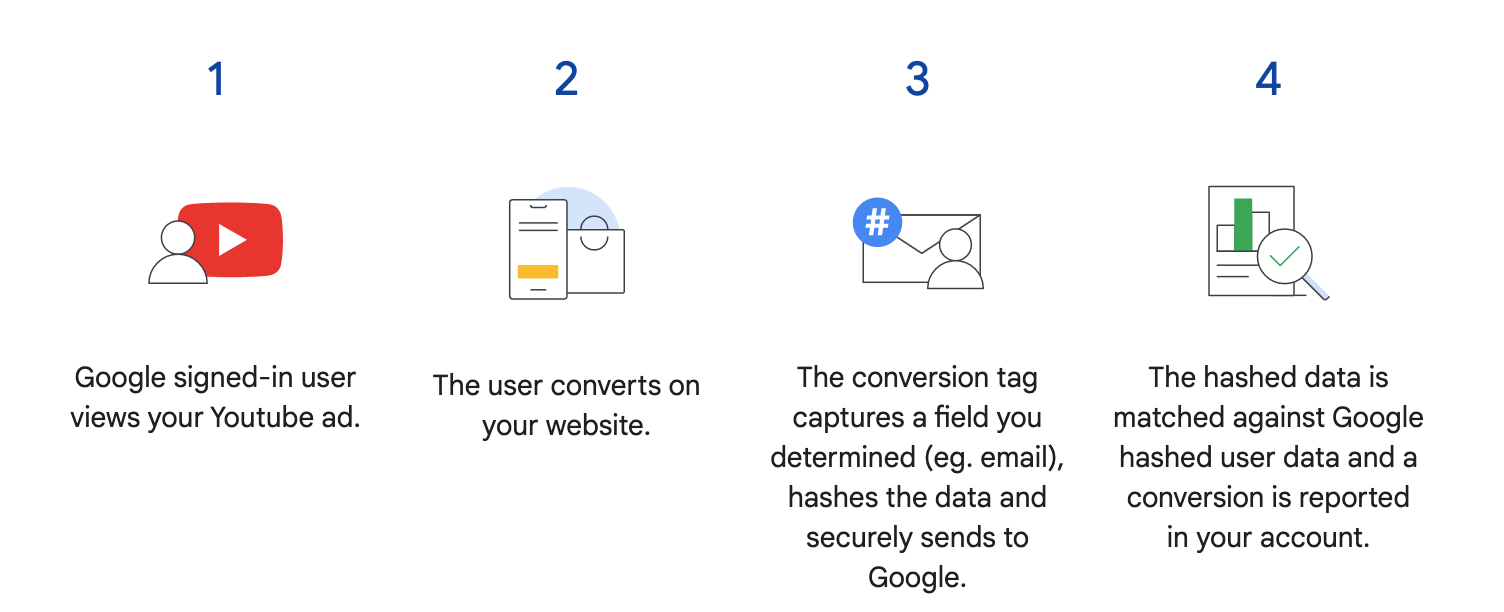
				<div class="et_pb_text_inner"><p><a href="https://support.google.com/google-ads/answer/9888656?hl=en-GB"><strong>Google Ad&#8217;s Enhanced Conversions</strong></a> allows us to send hashed (encrypted) customer data to Google Ads when a purchase event or lead has been submitted (including email address, phone number and name) for them to match against Google / Gmail accounts.</p>
<p><img fetchpriority="high" decoding="async" class="wp-image-7278 aligncenter size-full" src="http://silverbacklabs.net/wp-content/uploads/2022/05/Screenshot-2022-05-15-at-04.53.20.png" alt="Google Ads Enhanced Conversions" width="1504" height="612" srcset="http://silverbacklabs.net/wp-content/uploads/2022/05/Screenshot-2022-05-15-at-04.53.20.png 1504w, http://silverbacklabs.net/wp-content/uploads/2022/05/Screenshot-2022-05-15-at-04.53.20-1280x521.png 1280w, http://silverbacklabs.net/wp-content/uploads/2022/05/Screenshot-2022-05-15-at-04.53.20-980x399.png 980w, http://silverbacklabs.net/wp-content/uploads/2022/05/Screenshot-2022-05-15-at-04.53.20-480x195.png 480w" sizes="(min-width: 0px) and (max-width: 480px) 480px, (min-width: 481px) and (max-width: 980px) 980px, (min-width: 981px) and (max-width: 1280px) 1280px, (min-width: 1281px) 1504px, 100vw" /></p>
<p>It is a way to identify users across devices and improves campaign tracking because the conversion can be matched against a particular Google Account user when they saw a YouTube ad or clicked on a PPC ad while logged in.</p>
<p>This means that you can improve campaign tracking by supplementing conversion events with Enhanced Conversions rather than just relying on gclid / click id and UTM&#8217;s, which are prone to dropping on redirects and GDPR plugins.</p>
<p>Enhanced Conversions can be implemented via Gtag or Google Tag Manager and provides a combative approach to the <a href="https://silverbacklabs.net/google-analytics/ga4-analytics-platforms-cookieless-tracking-server-side-implementations/"><strong>cookie apocalypse</strong></a> in prevent conversion attribution being lost to the Direct Channel and making sure your paid campaigns can be optimised for performance.</p></div>
			</div>
			</div>


			</div><div class="et_pb_row et_pb_row_3">
				<div class="et_pb_column et_pb_column_4_4 et_pb_column_3  et_pb_css_mix_blend_mode_passthrough et-last-child">


				<div class="et_pb_module et_pb_post_nav_1 et_pb_posts_nav nav-single">
								<span class="nav-previous"
									>
					<a href="https://silverbacklabs.net/google-analytics/ga4-analytics-platforms-cookieless-tracking-server-side-implementations/" rel="prev">
												<span class="meta-nav">&larr; </span><span class="nav-label">The Future of Analytics and the Cookie Apocalypse: Cookieless Tracking and Server Side Implementations</span>
					</a>
				</span>
							<span class="nav-next"
									>
					<a href="https://silverbacklabs.net/google-analytics/ga4-difficulties-ga4-breaks-hearts-and-marketing-attribution-reports/" rel="next">
												<span class="nav-label">GA4 Difficulties: GA4 Breaks Hearts and Marketing Attribution Reports</span><span class="meta-nav"> &rarr;</span>
					</a>
				</span>
			
			</div>
			</div>


			</div>
				
				
			</div>
<p>The post <a href="https://silverbacklabs.net/google-tag-manager/google-ads-enhanced-conversions/">Google Ads Enhanced Conversions</a> appeared first on <a href="https://silverbacklabs.net">Silverback Labs</a>.</p>
]]></content>
		
					<link rel="replies" type="text/html" href="https://silverbacklabs.net/google-tag-manager/google-ads-enhanced-conversions/#comments" thr:count="0" />
			<link rel="replies" type="application/atom+xml" href="https://silverbacklabs.net/google-tag-manager/google-ads-enhanced-conversions/feed/atom/" thr:count="0" />
			<thr:total>0</thr:total>
			</entry>
		<entry>
		<author>
			<name>Killian</name>
							<uri>https://silverbacklabs.net/</uri>
						</author>

		<title type="html"><![CDATA[The Future of Analytics and the Cookie Apocalypse: Cookieless Tracking and Server Side Implementations]]></title>
		<link rel="alternate" type="text/html" href="https://silverbacklabs.net/google-analytics/ga4-analytics-platforms-cookieless-tracking-server-side-implementations/" />

		<id>https://silverbacklabs.net/?p=7186</id>
		<updated>2022-06-06T19:33:44Z</updated>
		<published>2022-05-15T03:19:00Z</published>
		<category scheme="https://silverbacklabs.net/" term="Google Analytics" /><category scheme="https://silverbacklabs.net/" term="Google Tag Manager" /><category scheme="https://silverbacklabs.net/" term="cookies" /><category scheme="https://silverbacklabs.net/" term="ga4" /><category scheme="https://silverbacklabs.net/" term="gdpr" /><category scheme="https://silverbacklabs.net/" term="google analytics" /><category scheme="https://silverbacklabs.net/" term="server side tracking" />
		<summary type="html"><![CDATA[<p>The post <a href="https://silverbacklabs.net/google-analytics/ga4-analytics-platforms-cookieless-tracking-server-side-implementations/">The Future of Analytics and the Cookie Apocalypse: Cookieless Tracking and Server Side Implementations</a> appeared first on <a href="https://silverbacklabs.net">Silverback Labs</a>.</p>
]]></summary>

					<content type="html" xml:base="https://silverbacklabs.net/google-analytics/ga4-analytics-platforms-cookieless-tracking-server-side-implementations/"><![CDATA[<div class="et_pb_section et_pb_section_2 et_section_regular" >


				<div class="et_pb_row et_pb_row_4">
				<div class="et_pb_column et_pb_column_4_4 et_pb_column_4  et_pb_css_mix_blend_mode_passthrough et-last-child">


				<div class="et_pb_module et_pb_text et_pb_text_2  et_pb_text_align_left et_pb_bg_layout_light">


				<div class="et_pb_text_inner"><p>When GA4 had its beta debut in 2020 it introduced <strong>significant challenges hindering migration</strong> / updating to the platform. The cross-overs with Universal Analytics (GA3) were fairly loose.</p>
<p>Namely:</p>
<ul>
<li><strong>Standard reports that everyone is used to are not pre-built</strong> &#8211; analysts found work arounds with a combination of BigQuery and DataStudio. For the most part though, marketing teams can&#8217;t just switch and maintain reporting continuity.</li>
<li>The concept of <strong>Sessions and Bounce Rate didn&#8217;t exist</strong>.</li>
<li>There were <strong>no filtering possibilities in the actual platform</strong> &#8211; some level of filters could be achieved via manipulating hit data in Google Tag Manager.</li>
<li>The <strong>UI and terminology is significantly different</strong> Universal Analytics and a learning curve in itself.</li>
<li>It wasn&#8217;t an updated version of Google Analytics, but a <strong>brand new platform with a brand new tracking methodology</strong> underpinning it.</li>
</ul>
<p>Adoption is definitely taking its time, mainly for the reasons mentioned above.</p>
<p>Although there has been some hype around needing to migrate to GA4 because of the <a href="https://blog.google/products/marketingplatform/analytics/prepare-for-future-with-google-analytics-4/" target="_blank" rel="noopener"><strong>sunset of Universal Analytics</strong></a> being announced for 1st July 2023, I have been hesitant to recommend fully switching platforms.</p>
<p><a href="https://silverbacklabs.net/google-analytics/ga4-migration-from-universal-analytics/"><strong>Dual tagged implementations are desirable</strong></a> with the caveat that GA4 is not a full featured platform, but it is good to get a head start with it.</p>
<h2>Google Analytics Cookies and GDPR Compliance</h2>
<p>Google Analytics stores data in a <a href="https://www.cookiepro.com/knowledge/whats-the-difference-between-first-and-third-party-cookies/#:~:text=First%2DParty%20Cookies&amp;text=An%20example%20of%20a%20first,is%20directly%20interacting%20with%20Amazon." target="_blank" rel="noopener"><strong>1st party cookie</strong></a> (_ga) including unique identifiers such as client ID and session ID, which are used to tie data to a particular session and user. The GA tracking script can continue to pull data from the browser without the cookie, but recording data without assigning a session ID or client ID on each pageview.</p>
<p>Given that the tracking methodology Universal Analytics is built on is <a href="https://silverbacklabs.net/google-analytics/session-vs-user-based-tracking-in-google-analytics/"><strong>Session and User based</strong></a>, this is a huge problem.</p>
<p>In a nutshell cookieless tracking is horrible for GA, Consent Mode and GDPR plugins that block cookies pre-consent but let analytics.js run are something to be avoided for GA3/UA &#8211; they make a mess of the data.</p>
<p><strong>The concept of Sessions and Users becomes redundant and will be reset on every pageview.</strong></p>
<p>This means you will still get acquisition data for that first pageview, but for the visitors that don&#8217;t opt in, the session resets and becomes Direct on every consecutive pageview. Conversion attribution will be lost to Direct on those Sessions.</p>
<p>Respecting consent isn&#8217;t the issue &#8211;<strong> cookieless tracking is</strong>. I&#8217;d recommend that you only deploy tracking scripts on opt-in rather than blocking cookies mixing messy data with the optimally collected data i.e. only inject the GTM container or Analytics javascript on opt-in.</p>
<p>I have seen sites lose up to a 3rd of their data / Session count by becoming compliant, but that is better than the skewed data cookieless tracking will give you.</p>
<p>Some GDPR plugins integrate with GTM by producing a dataLayer that outputs the consent status the user selected. This can be used as a trigger condition for all tracking and remarketing tags in a GTM container.</p>
<p><strong><a href="https://support.google.com/analytics/answer/9976101?hl=en" target="_blank" rel="noopener">Googles Consent Mode</a></strong> is still in beta, but it was designed for GA4. Adswerve have done some tests to monitor <a href="https://adswerve.com/blog/how-consent-mode-affects-the-way-google-analytics-records-data/" target="_blank" rel="noopener"><strong>how Consent Mode affects the recording of data in UA and GA4</strong></a>.</p>
<p>The main concern is that <strong>CM does not guarantee GDPR compliance</strong> and can be deceptive i.e. User Ids are still logged in BigQuery and it sends &#8220;anonymous&#8221; data to GA4 for &#8220;modeling&#8221; purposes even if the user declines cookies.</p>
<p>As always, ensuring GDPR compliance is something that should be advised by your legal team. It is always better to err on the side of caution, especially with <a href="https://www.cliffordchance.com/insights/resources/hubs-and-toolkits/talking-tech/en/articles/2022/02/google-analytics-declared-illegal-in-france-.html" target="_blank" rel="noopener"><strong>GA being made illegal in France recently</strong></a>.</p>
<h2>Server Side Tracking</h2>
<p>Data loss incurred by the cookie apocalypse has been blamed for the increase in cost per acquisition on ppc campaigns. <a href="https://developers.google.com/tag-platform/tag-manager/server-side/intro" target="_blank" rel="noopener"><strong>Server-side tracking</strong></a> (for GA4, UA, Google Ads, etc.) and the <a href="https://www.facebook.com/business/help/2041148702652965?id=818859032317965" target="_blank" rel="noopener"><strong>Facebook conversion API</strong></a> are combative against the cookie issue.</p>
<p>Server side GA4 is a server to server data collection solution (as opposed to browser to server).</p>
<p>It is comparable to what the Facebook Conversions API is to Facebook’s browser Pixel.</p>
<p>Benefits:</p>
<ul>
<li><strong>Reduced load on a page</strong> (site speed benefits)</li>
<li>Control what kind of data is sent to vendors via sGTM (i.e. <strong>ability to filter/edit cookies, fingerprinting, any data that might be considered PII</strong>)</li>
<li><strong>Extend the cookie expiration</strong> on Safari (ITP) from 7 days to 2 years</li>
<li><strong>Reduce the impact of ad blockers</strong></li>
</ul>
<p>Drawbacks:</p>
<ul>
<li><strong>Server is an extra on-going cost</strong> &#8211; $120/month+ based on bandwidth/usage.</li>
</ul>
<p>Server Side tracking isn&#8217;t actually new &#8211; Adobe Analytics and and other tag managers like Tealium have been server side for a long time already, but they are premium priced products.</p>
<p>&nbsp;</p>
<p>&nbsp;</p></div>
			</div>
			</div>


			</div><div class="et_pb_row et_pb_row_5">
				<div class="et_pb_column et_pb_column_4_4 et_pb_column_5  et_pb_css_mix_blend_mode_passthrough et-last-child">


				<div class="et_pb_module et_pb_post_nav_2 et_pb_posts_nav nav-single">
								<span class="nav-previous"
									>
					<a href="https://silverbacklabs.net/google-analytics/ga4-migration-from-universal-analytics/" rel="prev">
												<span class="meta-nav">&larr; </span><span class="nav-label">GA4: Considerations for Migration from UA</span>
					</a>
				</span>
							<span class="nav-next"
									>
					<a href="https://silverbacklabs.net/google-tag-manager/google-ads-enhanced-conversions/" rel="next">
												<span class="nav-label">Google Ads Enhanced Conversions</span><span class="meta-nav"> &rarr;</span>
					</a>
				</span>
			
			</div>
			</div>


			</div>
				
				
			</div>
<p>The post <a href="https://silverbacklabs.net/google-analytics/ga4-analytics-platforms-cookieless-tracking-server-side-implementations/">The Future of Analytics and the Cookie Apocalypse: Cookieless Tracking and Server Side Implementations</a> appeared first on <a href="https://silverbacklabs.net">Silverback Labs</a>.</p>
]]></content>
		
					<link rel="replies" type="text/html" href="https://silverbacklabs.net/google-analytics/ga4-analytics-platforms-cookieless-tracking-server-side-implementations/#comments" thr:count="0" />
			<link rel="replies" type="application/atom+xml" href="https://silverbacklabs.net/google-analytics/ga4-analytics-platforms-cookieless-tracking-server-side-implementations/feed/atom/" thr:count="0" />
			<thr:total>0</thr:total>
			</entry>
		<entry>
		<author>
			<name>Killian</name>
							<uri>https://silverbacklabs.net/</uri>
						</author>

		<title type="html"><![CDATA[GA4: Considerations for Migration from UA]]></title>
		<link rel="alternate" type="text/html" href="https://silverbacklabs.net/google-analytics/ga4-migration-from-universal-analytics/" />

		<id>https://silverbacklabs.net/?p=7233</id>
		<updated>2022-06-06T19:33:47Z</updated>
		<published>2022-04-18T10:44:11Z</published>
		<category scheme="https://silverbacklabs.net/" term="Ecommerce" /><category scheme="https://silverbacklabs.net/" term="Google Analytics" /><category scheme="https://silverbacklabs.net/" term="big query" /><category scheme="https://silverbacklabs.net/" term="ga4" /><category scheme="https://silverbacklabs.net/" term="google anlytics" /><category scheme="https://silverbacklabs.net/" term="machine learning" /><category scheme="https://silverbacklabs.net/" term="ua migration" />
		<summary type="html"><![CDATA[<p>The post <a href="https://silverbacklabs.net/google-analytics/ga4-migration-from-universal-analytics/">GA4: Considerations for Migration from UA</a> appeared first on <a href="https://silverbacklabs.net">Silverback Labs</a>.</p>
]]></summary>

					<content type="html" xml:base="https://silverbacklabs.net/google-analytics/ga4-migration-from-universal-analytics/"><![CDATA[<div class="et_pb_section et_pb_section_3 et_section_regular" >


				<div class="et_pb_row et_pb_row_6">
				<div class="et_pb_column et_pb_column_4_4 et_pb_column_6  et_pb_css_mix_blend_mode_passthrough et-last-child">


				<div class="et_pb_module et_pb_text et_pb_text_3  et_pb_text_align_left et_pb_bg_layout_light">


				<div class="et_pb_text_inner"><p><strong>GA4 is the latest version of Google Analytics</strong> (GA) that combines data or &#8216;<strong>data streams</strong>&#8216; from both apps (for example iOS and Android) and websites. Universal Analytics or GA3 is currently the most used version of the Analytics platform.</p>
<p>GA4 has actually already been around for sometime, it was previously named &#8216;App + Web&#8217; and <a href="https://infotrust.com/articles/ga4-firebase-analytics-differences/" target="_blank" rel="noopener"><strong>evolved from Firebase Analytics</strong></a>.</p>
<p>On 16th March 2022 Google announced their plan to sunset Universal Analytics (<strong><a href="https://blog.google/products/marketingplatform/analytics/prepare-for-future-with-google-analytics-4/" target="_blank" rel="noopener">https://blog.google/products/marketingplatform/analytics/prepare-for-future-with-google-analytics-4/</a></strong>) and encourage users to migrate to GA4.</p>
<p>All standard <strong>Universal Analytics properties will stop processing new hits on July 1, 2023</strong>. Universal Analytics 360 properties will receive an additional three months of new hit processing, ending on October 1, 2023.</p>
<p><strong>An important point to note is that data is not migrated from UA to GA4. </strong>A new GA4 Property will only collect data from the time of implementation.</p>
<p>If data is valuable to your company for reporting and monitoring KPI&#8217;s or optimising campaigns then having a back log of data already at disposal ready for when you fully switch to GA4 is vital.</p>
<p>Eventually, <strong>GA4 will be the standard for analytics</strong> (just as Universal Analytics has been). The evolving nature of internet technology has demanded a shift in tracking technologies to be able to navigate issues surrounding GDPR / Cookies and sophistication of web development.</p>
<p>&nbsp;</p>
<h2>Major Differences between UA/GA3 and GA4</h2>
<ul>
<li><strong>The interface.</strong> GA4 may look intimidating because many of the reports, dimensions and metrics your were used to with UA have either been removed or replace.</li>
<li><strong>The underlying tracking methodology.</strong> The platforms are very different and this is underpinned by a migration from Session based tracking in UA to Event based in GA4. This means that tracking is recorded and presented in a hit by hit basis in GA4, whereas in Universal Analytics all hits were tied to a particular Session or User. This essentially means GA4 is poised to handle cookieless tracking.</li>
<li><strong>The standard reports in GA4 are all new and very top level.</strong> Deeper analysis requires the user to create custom reports. If you rely on UA&#8217;s standard reports you will have to build custom solutions to match these in GA4 using either the Analysis Hub or an external data manipulation tool such as BigQuery or DataStudio.</li>
<li><strong>The tracking ID format.</strong> A UA tracking ID looks similar to UA-12345-1, whereas GA4 is similar to G-123451.</li>
<li><strong>Extra default data points.</strong> Scroll depth, form submits, on-site searches, file downloads and outbound link clicks are now all tracked by default. This was only possible in UA by adding custom tracking enhancements.</li>
<li><strong>View / Property setup.</strong> UA allowed the creation of multiple Views to be nested within a Property to segment data by territory, sub-domain, etc. GA4 does not (yet) acomodate Views within a Property. Any data segmentation must be done by set data streams for different sources of data, or creating Segments and applying them to the data set you are analysing or by creating multiple Properties for each data source.</li>
<li><strong>Ecommerce.</strong> The ecommerce tracking in GA4 is still in its infancy.</li>
</ul>
<p>&nbsp;</p>
<h2>New Features are Still Being Released</h2>
<p><strong>Bounce Rate</strong> was previously deprecated in GA4, but was recently announced to be re-introduced as the inverse of the new metric <a href="https://support.google.com/analytics/answer/11986666?hl=en#bounce_rate_vs_engagement_rate&amp;zippy=%2Cin-this-article" target="_blank" rel="noopener"><strong>Engagement Rate</strong></a>.</p>
<p>GA4 is still missing in built filters (the work around is to filter data at the implementation phase in GTM) and the ability to segment Properties into filtered Views. Note. it is not recommended to treat Data Streams as Views.</p>
<p><a href="https://docs.google.com/spreadsheets/d/1b-AO001mxAS5T4BGFd1ztyZD8WQ-P7fQmEBuCpT3k-4/edit#gid=0" target="_blank" rel="noopener"><strong>Charles Farina maintains a Google Sheet</strong></a> tracking GA4 feature releases and work arounds for missing items.</p>
<p>&nbsp;</p>
<h2>Features and Highlights</h2>
<ul>
<li><strong>Integration with Google Tools.</strong> BigQuery (a data warehouse and querying tool) was previously only available to GA360 customers. For anyone with SQL knowledge this is a powerful way to run custom queries fast without any issues of data sampling.</li>
<li><strong>Machine learning.</strong> A combinination of artificial intelligence and data science, is integrated into the new GA4 platform. Using machine learning, GA4 fills in data gaps and provides sophisticated insights about user behavior, trends, and anomalies.</li>
<li><strong>Cross-platform Analytics.</strong> Tracking users across apps and web was previously not possible. GA4 offers a solution to collect standardized data across multiple platforms.</li>
</ul>
<p>&nbsp;</p>
<h2>Prepare for a GA4 Migration</h2>
<p>It is recommended to run a <strong>dual tagged implementation of UA and GA4</strong> side by side until widespread adoption has been achieved and your teams are comfortable with the new interface and challenges a new platform brings.</p>
<p>Getting a GA4 implementation in place <strong>before July 1st 2022</strong> is very desirable so that you have 1 year+ of data in GA4 at the time that UA stops processing new hits.</p>
<p>More info: <a href="https://support.google.com/analytics/answer/9964640" target="_blank" rel="noopener"><strong>https://support.google.com/analytics/answer/9964640</strong></a></p>
<p>With regards to timescales it really depends on the website and the state of the current tracking implementation.</p>
<p>The preferred method of implementation is by far using <a href="https://tagmanager.google.com/" target="_blank" rel="noopener"><strong>Google Tag Manager</strong></a>. All of the Ecommerce and lead gen tracking implementations that I have built in the last year are forward compatible for GA4 in preparation for the inevitable switch, meaning that we can build on the foundation that is already put in place.</p>
<p>For new sites and especially Ecommerce sites the consideration requires planning. Setting up Ecommerce tracking is complicated in GA4, just as it was in Universal Analytics.</p>
<p>The road map is the same for any analytics project:</p>
<ul>
<li>Audit / scoping</li>
<li>Design a measurement framework</li>
<li>Implementation work and platform optimisation</li>
</ul>
<p>&nbsp;</p>
<h2>Things to Avoid</h2>
<p>Switching off or abandoning Universal Analytics and replacing it with a standalone GA4 implementation. Theres a learning curve to GA4, it&#8217;s more of a professional tool than UA.</p></div>
			</div>
			</div>


			</div><div class="et_pb_row et_pb_row_7">
				<div class="et_pb_column et_pb_column_4_4 et_pb_column_7  et_pb_css_mix_blend_mode_passthrough et-last-child">


				<div class="et_pb_module et_pb_post_nav_3 et_pb_posts_nav nav-single">
								<span class="nav-previous"
									>
					<a href="https://silverbacklabs.net/conversion-optimisation/ios-14-effects-on-ecommerce-profitability-and-declining-performance-trends/" rel="prev">
												<span class="meta-nav">&larr; </span><span class="nav-label">iOS 14+ Effects on Ecommerce Profitability and Declining Performance Trends</span>
					</a>
				</span>
							<span class="nav-next"
									>
					<a href="https://silverbacklabs.net/google-analytics/ga4-analytics-platforms-cookieless-tracking-server-side-implementations/" rel="next">
												<span class="nav-label">The Future of Analytics and the Cookie Apocalypse: Cookieless Tracking and Server Side Implementations</span><span class="meta-nav"> &rarr;</span>
					</a>
				</span>
			
			</div>
			</div>


			</div>
				
				
			</div>
<p>The post <a href="https://silverbacklabs.net/google-analytics/ga4-migration-from-universal-analytics/">GA4: Considerations for Migration from UA</a> appeared first on <a href="https://silverbacklabs.net">Silverback Labs</a>.</p>
]]></content>
		
					<link rel="replies" type="text/html" href="https://silverbacklabs.net/google-analytics/ga4-migration-from-universal-analytics/#comments" thr:count="0" />
			<link rel="replies" type="application/atom+xml" href="https://silverbacklabs.net/google-analytics/ga4-migration-from-universal-analytics/feed/atom/" thr:count="0" />
			<thr:total>0</thr:total>
			</entry>
		<entry>
		<author>
			<name>Killian</name>
							<uri>https://silverbacklabs.net/</uri>
						</author>

		<title type="html"><![CDATA[iOS 14+ Effects on Ecommerce Profitability and Declining Performance Trends]]></title>
		<link rel="alternate" type="text/html" href="https://silverbacklabs.net/conversion-optimisation/ios-14-effects-on-ecommerce-profitability-and-declining-performance-trends/" />

		<id>https://silverbacklabs.net/?p=7134</id>
		<updated>2021-11-11T16:17:27Z</updated>
		<published>2021-10-31T19:13:06Z</published>
		<category scheme="https://silverbacklabs.net/" term="Conversion Optimisation" /><category scheme="https://silverbacklabs.net/" term="Ecommerce" />
		<summary type="html"><![CDATA[<p>The post <a href="https://silverbacklabs.net/conversion-optimisation/ios-14-effects-on-ecommerce-profitability-and-declining-performance-trends/">iOS 14+ Effects on Ecommerce Profitability and Declining Performance Trends</a> appeared first on <a href="https://silverbacklabs.net">Silverback Labs</a>.</p>
]]></summary>

					<content type="html" xml:base="https://silverbacklabs.net/conversion-optimisation/ios-14-effects-on-ecommerce-profitability-and-declining-performance-trends/"><![CDATA[<div class="et_pb_section et_pb_section_4 et_section_regular" >


				<div class="et_pb_row et_pb_row_8">
				<div class="et_pb_column et_pb_column_4_4 et_pb_column_8  et_pb_css_mix_blend_mode_passthrough et-last-child">


				<div class="et_pb_module et_pb_text et_pb_text_4  et_pb_text_align_left et_pb_bg_layout_light">


				<div class="et_pb_text_inner"><h2>Privacy vs Tracking &#8211; Round 10: Fight</h2>
<p>The solution to iOS 14+ privacy settings is already available &#8211; <strong>server side tracking</strong>.</p>
<p>Not widely adopted (extra costs for server and implementation), but I am sure it will be within the next year&#8230;. (unlike full GA4 adoption, which is still a while away and only worthwhile for specific use cases i.e. data warehousing/BigQuery integration and predictive analysis)&#8230; <strong>BUT</strong> if advanced segmentation and behavioural targeting is part of the paid strategy, then server side tracking should be implemented by default.</p>
<p>I have noticed that it&#8217;s become a bit of a buzz word along with &#8216;Facebook API&#8217; with the PPC Agencies sales pitch, whether or not they understand the intricacies of it. So I hope to shed some light on this topic&#8230;</p>
<p>My observation (from the 50+ GA accounts of $10m+/year ecommerce sites that I have had access to in the last year or so), is that the majority of paid campaigns are not doing any kind of advanced targeting anyway (e.g. segments of visitors with a high probability to convert)&#8230; most are blanket campaigns for brand or product terms &#8211; which is good for overall brand awareness and down the funnel sales, but profitability/ROAS can not be optimised much on that&#8230;. and in these cases it&#8217;s only going to affect ad platform attribution data such as revenue/CR%&#8230;. not the bottom line business sales/P&amp;L reports in the CMS/ transactional platform. So it&#8217;s not going to result in a decline in overall profitability.</p>
<p>&nbsp;</p>
<h2>Post Covid World</h2>
<p>Advanced targeting goes hand in hand with conversion optimisation. If you took a look at ecommerce businesses doing $50m+/year complaining about declining performance you&#8217;d find unoptimised processes and untargetted campaigns &#8211; no doubt&#8230;&#8230;&#8230;.. <strong>BUT</strong> I also have a post covid opinion:</p>
<p style="padding-left: 40px;"><strong>Covid was significantly great for ecommerce businesses. It presented a period of massive growth for many and a nursery ground for many emerging players establishing themselves. People were shopping online more than ever. Shopify stock price grew from 325pts (March 2020) to 1650pts (July 2021) &#8211; <span style="text-decoration: underline;">407.692% increase</span>. No, I didn&#8217;t buy their stock, but I wish I did (don&#8217;t buy them now).</strong></p>
<p style="padding-left: 40px;"><strong>The bottom line is the shops are open now. </strong></p>
<p>Post covid, that is bound to drop. People spent enough&#8230;. and the spenders in the economy are going to be spending on entertainment next &#8211; clubs, events, restaurants, holidays, etc.</p>
<p>So a decline in retail ecommerce profitability is inevitable. This needs to be accepted in a business sense, and profits re-invested into customer retention and sustainable growth in the long term&#8230;. not chasing peak sale periods in the short term. The last year+ was a unique situation.</p>
<p>&nbsp;</p>
<h2>How Server Side Tracking Works</h2>
<p>Anyway, back to the iOS14+ issue and SS tracking &#8211; in simple terms this means:</p>
<ul>
<li><strong>Server to Server tracking</strong>/data transference a dedicated tracking server to the FB or Google Ad platform server.</li>
</ul>
<p>vs&#8230;&#8230;.. what is currently happening, which is:</p>
<ul>
<li><strong>Browser to Server</strong> (safari, chrome, etc. to fb or google server). It&#8217;s the browsers that are filtering and re-writing common tracking scripts such as FB and GA.</li>
</ul>
<p>&nbsp;</p>
<h2>Analytics in a GDPR Compliant World</h2>
<p>If you were not already aware, implementing server side tracking can be a grey area in terms of legality, because it by-passes consent and by-passes the new in-built privacy/protective features in browsers (depending on how you set it up).</p>
<p>Server side tracking = no restrictions are automatically enforced. <strong>BUT Shopify already offers the FB API (server side) within their native FB app.</strong> Enough said.</p>
<p>&nbsp;</p>
<h2>Costs vs Benefits</h2>
<p>Server side is new-ish to GTM (free)&#8230;. but has been a long standing feature in other tag management platforms such as Tealeum and Adobe (paid) &#8211; at the end of the day you get what you pay for &#8230;but as I said I think this matters more if advanced segmentation and targeting is the primary strategy for re-marketing audiences.</p>
<p>If you are implementing a server side tracking implementation via Google Tag Manager, all you need to front is the per usage hosting/bandwidth costs. Making it very affordable as this can be pitted against campaign spend.</p>
<p>Tealium is around the mark of $150 &#8211; $450 / month and Adobe is significantly more.</p>
<p>For blanket campaigns (brand/non-brand keywords) attribution data may be missing, but business profitability won&#8217;t be affected. If there is a decline it is for other reasons. So there is no real need to spend on server side tracking, unless it&#8217;s just to asses/justify ad spend.</p>
<p>&nbsp;</p>
<h2>The Future of Supply Chain Management</h2>
<p>I have seen many complaints of supply chain issues causing profitability issues and comments around this instigating a migration of manufacturing to home soil (US or EU) in the next decade &#8211; my opinion is:</p>
<p><strong>Nonsense. No way.</strong></p>
<p>Not unless end-product prices become astronomically high.</p>
<p>Firstly, we still need to source raw material (Cobalt, Silicone, Copper and Quartz for chipsets in any electronics from China, Brazil and Africa) and the majority of the worlds cotton comes from China, India, US and Brazil&#8230;and then secondly the cost of the labour force is not going to be cheaper than shipping costs.</p>
<p>Why move production to a more expensive labour force if highly skilled Western workers are not needed? Machine lead/non-manned factories would need to become dominant.</p>
<p>If profitability is principal over quality (which it has been on the mass scale historically), then larger brands are not going to do this&#8230;. only the small to medium enterprises could consider it. Small are probs already home soil&#8230; but their profitability is on the lower end of the scale, and they will want to grow eventually.</p>
<p>Saying that the world is changing, the income gap is becoming smaller&#8230; but the West still houses the most skilled workers which are dedicated to high-tech, creative and finance industries and developing nations are more suited to manufacturing and a source of affordable craftsmanship. Supply chain/shipping process evolving into more refined practices out of the current deficit is much more likely.</p>
<p>&nbsp;</p>
<h2>The Key to Profitability</h2>
<p>If I were to survey 50 $50m+/year ecomm businesses I would find out what their most profitable products were and find out why, then what their highest converting acquisition sources are, then highest performing campaigns (i.e. brand vs product vs generic vs remarketing) &#8230;and then scale and cut accordingly. The method is simple enough.</p>
<p>&#8230;and if I wanted to increase Revenue and CR in the short term it would all be focused on technical on site analysis to identify and fix UX fails. Mid to long term &#8211; not increasing ad spend, but optimising return on ad spend by behavioural retargeting.</p>
<p>&#8230;and, yes. I would push them to implement server side tracking much sooner than suggesting GA4, but for data analysis and to enable profitability in advanced remarketing campaigns&#8230; not just to tick a box on a list of services offered.</p></div>
			</div>
			</div>


			</div><div class="et_pb_row et_pb_row_9">
				<div class="et_pb_column et_pb_column_4_4 et_pb_column_9  et_pb_css_mix_blend_mode_passthrough et-last-child">


				<div class="et_pb_module et_pb_post_nav_4 et_pb_posts_nav nav-single">
								<span class="nav-previous"
									>
					<a href="https://silverbacklabs.net/google-analytics/how-to-link-google-search-console-to-google-analytics/" rel="prev">
												<span class="meta-nav">&larr; </span><span class="nav-label">How to Link Google Search Console to Google Analytics</span>
					</a>
				</span>
							<span class="nav-next"
									>
					<a href="https://silverbacklabs.net/google-analytics/ga4-migration-from-universal-analytics/" rel="next">
												<span class="nav-label">GA4: Considerations for Migration from UA</span><span class="meta-nav"> &rarr;</span>
					</a>
				</span>
			
			</div>
			</div>


			</div>
				
				
			</div>
<p>The post <a href="https://silverbacklabs.net/conversion-optimisation/ios-14-effects-on-ecommerce-profitability-and-declining-performance-trends/">iOS 14+ Effects on Ecommerce Profitability and Declining Performance Trends</a> appeared first on <a href="https://silverbacklabs.net">Silverback Labs</a>.</p>
]]></content>
		
					<link rel="replies" type="text/html" href="https://silverbacklabs.net/conversion-optimisation/ios-14-effects-on-ecommerce-profitability-and-declining-performance-trends/#comments" thr:count="0" />
			<link rel="replies" type="application/atom+xml" href="https://silverbacklabs.net/conversion-optimisation/ios-14-effects-on-ecommerce-profitability-and-declining-performance-trends/feed/atom/" thr:count="0" />
			<thr:total>0</thr:total>
			</entry>
		<entry>
		<author>
			<name>Killian</name>
							<uri>https://silverbacklabs.net/</uri>
						</author>

		<title type="html"><![CDATA[How to Link Google Search Console to Google Analytics]]></title>
		<link rel="alternate" type="text/html" href="https://silverbacklabs.net/google-analytics/how-to-link-google-search-console-to-google-analytics/" />

		<id>https://silverbacklabs.net/?p=7187</id>
		<updated>2021-11-08T08:24:59Z</updated>
		<published>2021-09-07T08:22:25Z</published>
		<category scheme="https://silverbacklabs.net/" term="Google Analytics" />
		<summary type="html"><![CDATA[<p>The post <a href="https://silverbacklabs.net/google-analytics/how-to-link-google-search-console-to-google-analytics/">How to Link Google Search Console to Google Analytics</a> appeared first on <a href="https://silverbacklabs.net">Silverback Labs</a>.</p>
]]></summary>

					<content type="html" xml:base="https://silverbacklabs.net/google-analytics/how-to-link-google-search-console-to-google-analytics/"><![CDATA[<div class="et_pb_section et_pb_section_5 et_section_regular" >


				<div class="et_pb_row et_pb_row_10">
				<div class="et_pb_column et_pb_column_4_4 et_pb_column_10  et_pb_css_mix_blend_mode_passthrough et-last-child">


				<div class="et_pb_module et_pb_text et_pb_text_5  et_pb_text_align_left et_pb_bg_layout_light">


				<div class="et_pb_text_inner"><h2>Use Case</h2>
<p><strong>Google Analytics</strong> tracks visitor activity <strong>on your domain</strong>, whereas <strong>Google Search Console</strong> tracks visitor activity (related to your domain) <strong>on google.com</strong> (search results pages).</p>
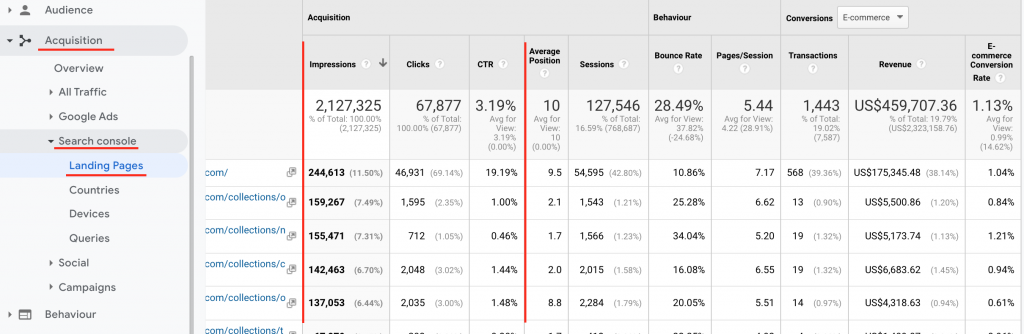
<p>Linking Google Analytics with Google Search Console will <strong>enrich your data</strong> with organic search performance metrics.</p>
<p>Goal completions for landing pages, devices and countries from Organic Search will be available alongside search impression and click stats. Make informed decisions on how to optimise Landing Page presentation and experience.</p>
<p>&nbsp;</p>
<h3>Set Up or Log into a Search Console Account.</h3>
<ul>
<li>Log in to your existing account or if you do not have one create a new account account for your domain at <strong><a href="https://search.google.com/search-console" target="_blank" rel="noopener">https://search.google.com/search-console</a></strong>. If you already have an account skip the next 3 steps.</li>
</ul>
<h3>Open the left side navigation menu by clicking the icon in the top bar.</h3>
<ul>
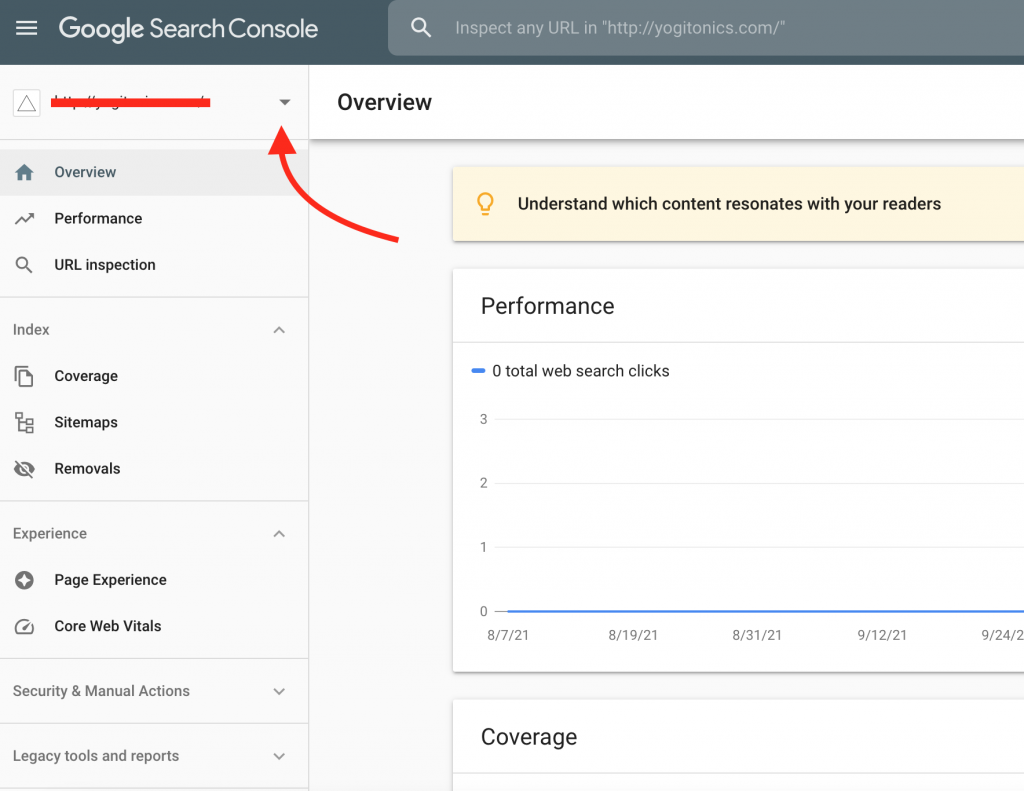
<li>Click the drop down arrow in the search bar.
<p><img loading="lazy" decoding="async" src="http://silverbacklabs.net/wp-content/uploads/2021/11/setup-google-search-console-google-analytics-silverback-labs-1024x791.png" width="1024" height="791" alt="Setup Google Search Console - Google Analytics - Silverback Labs" class="wp-image-7198 aligncenter size-large" srcset="http://silverbacklabs.net/wp-content/uploads/2021/11/setup-google-search-console-google-analytics-silverback-labs-980x757.png 980w, http://silverbacklabs.net/wp-content/uploads/2021/11/setup-google-search-console-google-analytics-silverback-labs-480x371.png 480w" sizes="(min-width: 0px) and (max-width: 480px) 480px, (min-width: 481px) and (max-width: 980px) 980px, (min-width: 981px) 1024px, 100vw" /></p>
</li>
<li>Click the ‘<strong>Add Property</strong>’ button.</li>
</ul>
<h3>Select the type of Search Console property to create.</h3>
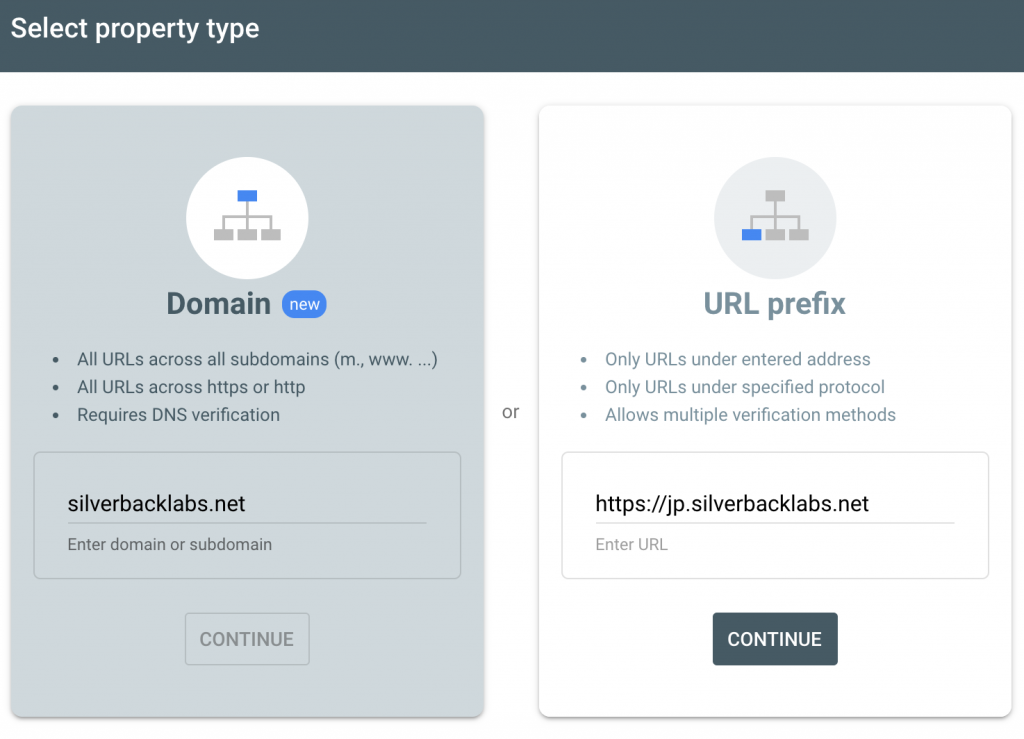
<p><div id="attachment_7201" style="width: 1034px" class="wp-caption aligncenter"><img loading="lazy" decoding="async" aria-describedby="caption-attachment-7201" src="http://silverbacklabs.net/wp-content/uploads/2021/11/google-search-console-property-type-silverback-labs-1-1024x739.png" width="1024" height="739" alt="Select the Google Search Console Property type - Silverback Labs" class="wp-image-7201 size-large" srcset="http://silverbacklabs.net/wp-content/uploads/2021/11/google-search-console-property-type-silverback-labs-1-980x707.png 980w, http://silverbacklabs.net/wp-content/uploads/2021/11/google-search-console-property-type-silverback-labs-1-480x346.png 480w" sizes="(min-width: 0px) and (max-width: 480px) 480px, (min-width: 481px) and (max-width: 980px) 980px, (min-width: 981px) 1024px, 100vw" /><p id="caption-attachment-7201" class="wp-caption-text">Two Property types are available in GSC. <strong>Domain level</strong> and <strong>URL prefix</strong>.</p></div></p>
<ul>
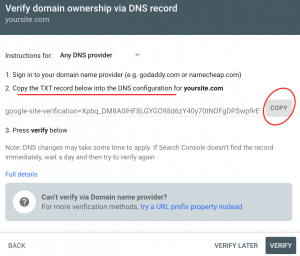
<li><strong>Domain</strong> &#8211; this is your top level domain and will include <strong>all sub-domains</strong> nested under it as well as <strong>BOTH http and https</strong> (SSL) instances. This solution covers all bases.<div id="attachment_7203" style="width: 1034px" class="wp-caption aligncenter"><img loading="lazy" decoding="async" aria-describedby="caption-attachment-7203" src="http://silverbacklabs.net/wp-content/uploads/2021/11/google-search-console-dns-verification-silverback-labs-300x256.png" width="300" height="256" alt="Google Search Console DNS Verification - Silverback Labs" class="wp-image-7203 size-medium" /><p id="caption-attachment-7203" class="wp-caption-text">Copy the TXT record for DNS Verification.</p></div></li>
<li><strong>DNS (Domain Name System) verification is a requirement for this type of Property</strong>, and is completed via your DNS provider / registrar e.g. <strong><a href="https://godaddy.com/" target="_blank" rel="noopener" title="Go Daddy">godaddy</a></strong>, <strong><a href="https://www.namecheap.com/" target="_blank" rel="noopener" title="Namecheap">namecheap</a></strong>, etc. If you are unsure of how to add the TXT records to your DNS settings, contact your registrar&#8217;s support team for guidance.</li>
<li>This type of GSC property has been around for a while now, but it’s still in beta. As such (at the time of writing this &#8211; Sept 2021) it cannot currently be linked to Google Analytics.</li>
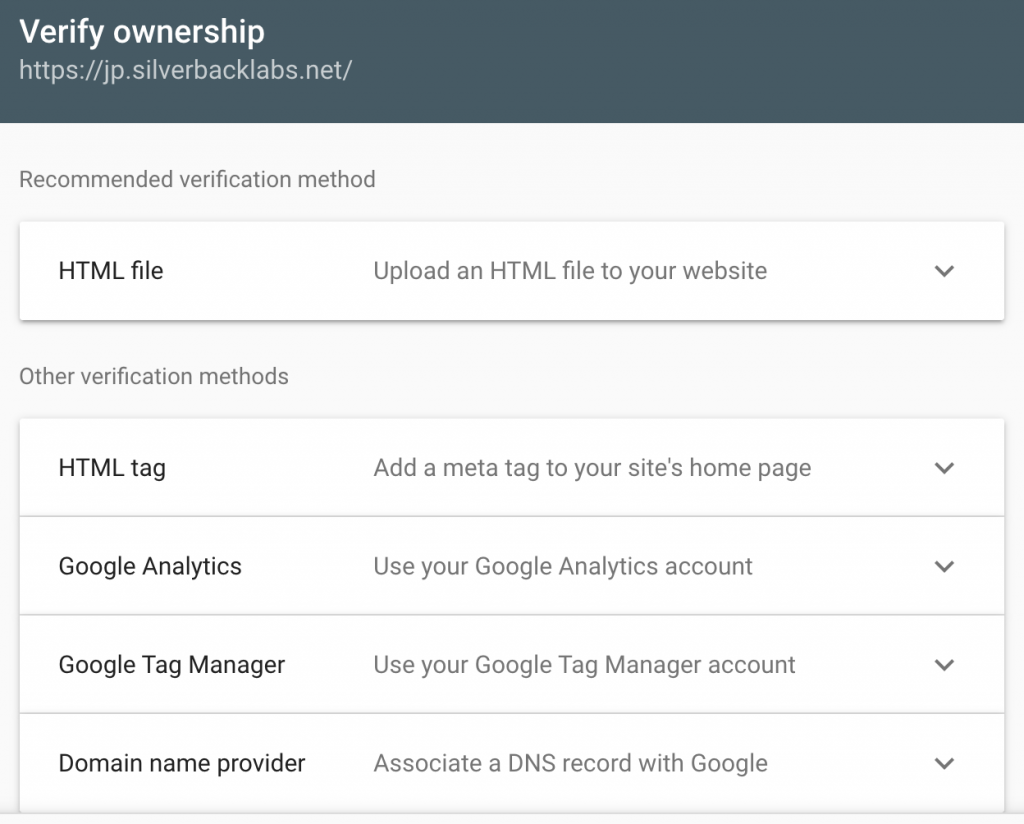
<li><strong>URL prefix</strong> &#8211; this is a <strong>specific domain URL</strong>. In the example in the screenshot I have entered the precise URL https://jp.silverbacklabs.net.</li>
<li>Multiple verification methods are available to choose from (you only need to do one):</li>
</ul>
<p><div id="attachment_7202" style="width: 1034px" class="wp-caption aligncenter"><img loading="lazy" decoding="async" aria-describedby="caption-attachment-7202" src="http://silverbacklabs.net/wp-content/uploads/2021/11/verify-google-search-console-silverback-labs-1024x824.png" width="1024" height="824" alt="Verify Google Search Console - Silverback Labs" class="wp-image-7202 size-large" srcset="http://silverbacklabs.net/wp-content/uploads/2021/11/verify-google-search-console-silverback-labs-1024x824.png 1024w, http://silverbacklabs.net/wp-content/uploads/2021/11/verify-google-search-console-silverback-labs-980x788.png 980w, http://silverbacklabs.net/wp-content/uploads/2021/11/verify-google-search-console-silverback-labs-480x386.png 480w" sizes="(min-width: 0px) and (max-width: 480px) 480px, (min-width: 481px) and (max-width: 980px) 980px, (min-width: 981px) 1024px, 100vw" /><p id="caption-attachment-7202" class="wp-caption-text">Verify your domain using one of the methods available.</p></div></p>
<h3>Follow the instructions for your chosen method of verification.</h3>
<ul>
<li>HTML file (adding the HTML file to your websites root directory) and domain name provider (adding a DNS record associated with your GSC account) are the most reliable methods.</li>
<li>I have often found the others to be temperamental &#8211; especially the Google Analytics and Google Tag Manager connectors.</li>
<li>The HTML meta tag <strong>cannot be injected</strong> via Google Tag Manger, you will need to add this directly into your theme code (homepage header).</li>
<li>You will likely want to verify several URL prefixes at the same time, including http vs https variations and different sub-domains as well as the top-level domain. For example:
<p><a href="https://yoursite.com">https://yoursite.com</a><br />http://yoursite.com<br />https://pt.yoursite.com<br /><a href="https://de.yoursite.com">https://de.yoursite.com</a></p>
</li>
<li>To do this repeat steps 2 and 3 for each URL prefix that you want to add to Search Console.</li>
<li>Note that you can only add one Search Console Property to a Google Analytics Property.</li>
<li><strong>I recommend completing verification for both types of Search Console Properties &#8211; Domain and URL Prefix.</strong> The data will only start recording in the account from the date the property was created and its best to have this data available at hand incase it is useful in the future.</li>
</ul>
<h3>Log into Google Analytics to link the account with Search Console.</h3>
<ul>
<li>You must be using the same Google account and that the Search Console property was verified from to be able to complete this step.</li>
<li>Click the <strong>Admin</strong> cog in the bottom left of the screen.</li>
<li>Navigate to <span style="color: #e02b20;"><strong>Property &gt; Product Linking &gt; All Products</strong></span>. <div id="attachment_7204" style="width: 1034px" class="wp-caption aligncenter"><img loading="lazy" decoding="async" aria-describedby="caption-attachment-7204" src="http://silverbacklabs.net/wp-content/uploads/2021/11/product-linking-google-search-console-google-analytics-silverback-labs-1024x533.png" width="1024" height="533" alt="Product Linking - Google Search Console to Google Analytics - Silverback Labs" class="wp-image-7204 size-large" srcset="http://silverbacklabs.net/wp-content/uploads/2021/11/product-linking-google-search-console-google-analytics-silverback-labs-980x510.png 980w, http://silverbacklabs.net/wp-content/uploads/2021/11/product-linking-google-search-console-google-analytics-silverback-labs-480x250.png 480w" sizes="(min-width: 0px) and (max-width: 480px) 480px, (min-width: 481px) and (max-width: 980px) 980px, (min-width: 981px) 1024px, 100vw" /><p id="caption-attachment-7204" class="wp-caption-text">Select &#8216;<span style="color: #e02b20;"><strong>All Products</strong></span>&#8216; from the <strong>Product Linking</strong> menu under <strong>Property Settings</strong>.</p></div></li>
<li>Scroll down the list till you find <strong>Search Console</strong> and then click the ‘<span style="color: #e02b20;"><strong>Link Search Console</strong></span>’ button. <div id="attachment_7206" style="width: 1034px" class="wp-caption aligncenter"><img loading="lazy" decoding="async" aria-describedby="caption-attachment-7206" src="http://silverbacklabs.net/wp-content/uploads/2021/11/connect-google-search-console-google-analytics-silverback-labs-1024x878.png" width="1024" height="878" alt="Find Search Console in the list of possible Google products." class="wp-image-7206 size-large" srcset="http://silverbacklabs.net/wp-content/uploads/2021/11/connect-google-search-console-google-analytics-silverback-labs-1024x878.png 1024w, http://silverbacklabs.net/wp-content/uploads/2021/11/connect-google-search-console-google-analytics-silverback-labs-980x840.png 980w, http://silverbacklabs.net/wp-content/uploads/2021/11/connect-google-search-console-google-analytics-silverback-labs-480x412.png 480w" sizes="(min-width: 0px) and (max-width: 480px) 480px, (min-width: 481px) and (max-width: 980px) 980px, (min-width: 981px) 1024px, 100vw" /><p id="caption-attachment-7206" class="wp-caption-text">Find Search Console in the list of possible Google products.</p></div></li>
</ul>
<h3>Click the ‘add’ button and select the Google Search Console Property for the correct domain.</h3>
<h3>Select the Google Analytics Views that you want to import Search Console data to.</h3>
<ul>
<li>Select all relevant Views from the dropdown list. Ensure that you do not import the data to unrelated Views.</li>
</ul>
<p><div id="attachment_7207" style="width: 1034px" class="wp-caption aligncenter"><img loading="lazy" decoding="async" aria-describedby="caption-attachment-7207" src="http://silverbacklabs.net/wp-content/uploads/2021/11/select-views-link-google-search-console-google-analytics-silverback-labs-300x251.png" width="300" height="251" alt="Select the Google Analytics Views that you want to import Google Search Console data in to." class="wp-image-7207 size-medium" /><p id="caption-attachment-7207" class="wp-caption-text">Select the Google Analytics Views that you want to import Google Search Console data to.</p></div></p>
<h3>Review Search Console data in Google Analytics reports.</h3>
<ul>
<li>Data is only recorded in your Google Analytics account from the date the two accounts were linked, it is not available retro-actively.</li>
<li>Navigate to <span style="color: #e02b20;"><strong>Acquisition &gt; Search Console &gt; Landing Pages</strong></span>.
<p><div id="attachment_7208" style="width: 1034px" class="wp-caption aligncenter"><img loading="lazy" decoding="async" aria-describedby="caption-attachment-7208" src="http://silverbacklabs.net/wp-content/uploads/2021/11/laning-page-report-google-search-console-google-analytics-silverback-labs-1024x334.png" width="1024" height="334" alt="Search Console Landing Page data in Google Analytics - Silverback Labs" class="wp-image-7208 size-large" srcset="http://silverbacklabs.net/wp-content/uploads/2021/11/laning-page-report-google-search-console-google-analytics-silverback-labs-980x320.png 980w, http://silverbacklabs.net/wp-content/uploads/2021/11/laning-page-report-google-search-console-google-analytics-silverback-labs-480x157.png 480w" sizes="(min-width: 0px) and (max-width: 480px) 480px, (min-width: 481px) and (max-width: 980px) 980px, (min-width: 981px) 1024px, 100vw" /><p id="caption-attachment-7208" class="wp-caption-text">Search Console Landing Page Impression and Click data in Google Analytics.</p></div></p>
</li>
<li>You can now review <strong>Search Console Impressions and Click data</strong> alongside behaviour and conversion metrics (ecommerce and Goals).</li>
</ul></div>
			</div>
			</div>


			</div><div class="et_pb_row et_pb_row_11">
				<div class="et_pb_column et_pb_column_4_4 et_pb_column_11  et_pb_css_mix_blend_mode_passthrough et-last-child">


				<div class="et_pb_module et_pb_post_nav_5 et_pb_posts_nav nav-single">
								<span class="nav-previous"
									>
					<a href="https://silverbacklabs.net/google-analytics/how-to-link-google-ads-to-google-analytics/" rel="prev">
												<span class="meta-nav">&larr; </span><span class="nav-label">How to Link Google Ads to Google Analytics</span>
					</a>
				</span>
							<span class="nav-next"
									>
					<a href="https://silverbacklabs.net/conversion-optimisation/ios-14-effects-on-ecommerce-profitability-and-declining-performance-trends/" rel="next">
												<span class="nav-label">iOS 14+ Effects on Ecommerce Profitability and Declining Performance Trends</span><span class="meta-nav"> &rarr;</span>
					</a>
				</span>
			
			</div>
			</div>


			</div>
				
				
			</div>
<p>The post <a href="https://silverbacklabs.net/google-analytics/how-to-link-google-search-console-to-google-analytics/">How to Link Google Search Console to Google Analytics</a> appeared first on <a href="https://silverbacklabs.net">Silverback Labs</a>.</p>
]]></content>
		
					<link rel="replies" type="text/html" href="https://silverbacklabs.net/google-analytics/how-to-link-google-search-console-to-google-analytics/#comments" thr:count="0" />
			<link rel="replies" type="application/atom+xml" href="https://silverbacklabs.net/google-analytics/how-to-link-google-search-console-to-google-analytics/feed/atom/" thr:count="0" />
			<thr:total>0</thr:total>
			</entry>
		<entry>
		<author>
			<name>Killian</name>
							<uri>https://silverbacklabs.net/</uri>
						</author>

		<title type="html"><![CDATA[How to Link Google Ads to Google Analytics]]></title>
		<link rel="alternate" type="text/html" href="https://silverbacklabs.net/google-analytics/how-to-link-google-ads-to-google-analytics/" />

		<id>https://silverbacklabs.net/?p=7170</id>
		<updated>2021-11-02T11:14:26Z</updated>
		<published>2021-08-02T11:12:52Z</published>
		<category scheme="https://silverbacklabs.net/" term="Google Analytics" />
		<summary type="html"><![CDATA[<p>The post <a href="https://silverbacklabs.net/google-analytics/how-to-link-google-ads-to-google-analytics/">How to Link Google Ads to Google Analytics</a> appeared first on <a href="https://silverbacklabs.net">Silverback Labs</a>.</p>
]]></summary>

					<content type="html" xml:base="https://silverbacklabs.net/google-analytics/how-to-link-google-ads-to-google-analytics/"><![CDATA[<div class="et_pb_section et_pb_section_6 et_section_regular" >


				<div class="et_pb_row et_pb_row_12">
				<div class="et_pb_column et_pb_column_4_4 et_pb_column_12  et_pb_css_mix_blend_mode_passthrough et-last-child">


				<div class="et_pb_module et_pb_text et_pb_text_6  et_pb_text_align_left et_pb_bg_layout_light">


				<div class="et_pb_text_inner"><h2>Use Case</h2>
<p>Import campaign traffic performance data into <strong>Google Ads</strong>, unlock the <strong>Google Ads reports in Google Analytics</strong> and create remarketing campaigns based on analytics data and <strong>Audience Segments</strong>.</p>
<p>&nbsp;</p>
<h3>Log into a Google account that has admin level access to the relevant accounts for both Google Analytics and Google Ads.</h3>
<ul>
<li>Open the <strong>Admin</strong> panel in <strong>Google Analytics</strong>.</li>
<li>Go to <span style="color: #ff0000;"><strong>Admin &gt; Property Settings &gt; Product Linking &gt; Google Ads Linking</strong></span> to access the Google Ads linking settings.</li>
</ul>
<p style="text-align: center;"><div id="attachment_7174" style="width: 1034px" class="wp-caption aligncenter"><img loading="lazy" decoding="async" aria-describedby="caption-attachment-7174" src="http://silverbacklabs.net/wp-content/uploads/2021/11/link-google-ads-to-google-analytics-silverback-labs-1024x481.png" width="1024" height="481" alt="Navigate to Admin &gt; Property Settings &gt; Product Linking &gt; Google Ads Linking." class="wp-image-7174 size-large" srcset="http://silverbacklabs.net/wp-content/uploads/2021/11/link-google-ads-to-google-analytics-silverback-labs-980x460.png 980w, http://silverbacklabs.net/wp-content/uploads/2021/11/link-google-ads-to-google-analytics-silverback-labs-480x226.png 480w" sizes="(min-width: 0px) and (max-width: 480px) 480px, (min-width: 481px) and (max-width: 980px) 980px, (min-width: 981px) 1024px, 100vw" /><p id="caption-attachment-7174" class="wp-caption-text">Navigate to Admin &gt; Property Settings &gt; Product Linking &gt; Google Ads Linking.</p></div></p>
<h3>Select the Ad account IDs that you want to link to this Google Analytics account.</h3>
<ul>
<li>You can link multiple <strong>Google Ads accounts</strong> to one <strong>Google Analytics Property</strong>, and assign them to individual <strong>Views</strong> as appropriate.</li>
<li>Leave any other unrelated Ad accounts unticked.</li>
<li>Click the ‘Continue’ button.</li>
<li>If you do not see the Google Ads account you were expecting, then make sure that you have admin level access to the account.</li>
</ul>
<p style="text-align: center;"><div id="attachment_7175" style="width: 1034px" class="wp-caption aligncenter"><img loading="lazy" decoding="async" aria-describedby="caption-attachment-7175" src="http://silverbacklabs.net/wp-content/uploads/2021/11/select-ad-accounts-to-link-google-analytics-silverback-labs-1024x576.png" width="1024" height="576" alt="Select the Google Ad accounts that you want to link to." class="wp-image-7175 size-large" srcset="http://silverbacklabs.net/wp-content/uploads/2021/11/select-ad-accounts-to-link-google-analytics-silverback-labs-980x551.png 980w, http://silverbacklabs.net/wp-content/uploads/2021/11/select-ad-accounts-to-link-google-analytics-silverback-labs-480x270.png 480w" sizes="(min-width: 0px) and (max-width: 480px) 480px, (min-width: 481px) and (max-width: 980px) 980px, (min-width: 981px) 1024px, 100vw" /><p id="caption-attachment-7175" class="wp-caption-text">Select the Google Ad accounts that you want to link to.</p></div></p>
<h3>Give the Link Group a title that describes the set of accounts you are linking.</h3>
<ul>
<li>For example the website name or the agency name that manages the accounts.</li>
</ul>
<h3>Switch on linking for every View that you want to receive Google Ads data by clicking the slider button.</h3>
<ul>
<li>In most cases this will be every <strong>View</strong> that is in the <strong>Property</strong>. Examples of Views that you might prefer to leave unlinked are Views that do not receive live traffic like Dev views or perhaps Views that correspond to a different site / country hostname that does not receive traffic from</li>
<li>If you add new <strong>Views</strong> in the future, be sure to repeat this step to make sure it receives <strong>Google Ads</strong> data.</li>
</ul>
<p style="text-align: center;"><div id="attachment_7176" style="width: 1034px" class="wp-caption aligncenter"><img loading="lazy" decoding="async" aria-describedby="caption-attachment-7176" src="http://silverbacklabs.net/wp-content/uploads/2021/11/select-google-analytics-views-connect-google-ads-silverback-labs-1024x872.png" width="1024" height="872" alt="Complete the Link Configuration settings, be sure to select the correct Google Ads accounts." class="wp-image-7176 size-large" srcset="http://silverbacklabs.net/wp-content/uploads/2021/11/select-google-analytics-views-connect-google-ads-silverback-labs-980x835.png 980w, http://silverbacklabs.net/wp-content/uploads/2021/11/select-google-analytics-views-connect-google-ads-silverback-labs-480x409.png 480w" sizes="(min-width: 0px) and (max-width: 480px) 480px, (min-width: 481px) and (max-width: 980px) 980px, (min-width: 981px) 1024px, 100vw" /><p id="caption-attachment-7176" class="wp-caption-text">Complete the Link Configuration settings, be sure to select the correct Google Ads accounts.</p></div></p>
<h3>Tick the ‘Data Sharing’ checkbox under the Account Settings heading.</h3>
<ul>
<li>This allows <strong>Google Analytics</strong> to share data with <strong>Google Ads</strong>.</li>
</ul>
<h3>Click the ‘Link Accounts’ button and then the ‘Done’ button to complete the process and save the linking setup.</h3></div>
			</div>
			</div>


			</div><div class="et_pb_row et_pb_row_13">
				<div class="et_pb_column et_pb_column_4_4 et_pb_column_13  et_pb_css_mix_blend_mode_passthrough et-last-child">


				<div class="et_pb_module et_pb_post_nav_6 et_pb_posts_nav nav-single">
								<span class="nav-previous"
									>
					<a href="https://silverbacklabs.net/google-analytics/uncover-common-tracking-mistakes-in-google-analytics/" rel="prev">
												<span class="meta-nav">&larr; </span><span class="nav-label">Uncover Common Tracking Mistakes in Google Analytics</span>
					</a>
				</span>
							<span class="nav-next"
									>
					<a href="https://silverbacklabs.net/google-analytics/how-to-link-google-search-console-to-google-analytics/" rel="next">
												<span class="nav-label">How to Link Google Search Console to Google Analytics</span><span class="meta-nav"> &rarr;</span>
					</a>
				</span>
			
			</div>
			</div>


			</div>
				
				
			</div>
<p>The post <a href="https://silverbacklabs.net/google-analytics/how-to-link-google-ads-to-google-analytics/">How to Link Google Ads to Google Analytics</a> appeared first on <a href="https://silverbacklabs.net">Silverback Labs</a>.</p>
]]></content>
		
					<link rel="replies" type="text/html" href="https://silverbacklabs.net/google-analytics/how-to-link-google-ads-to-google-analytics/#comments" thr:count="0" />
			<link rel="replies" type="application/atom+xml" href="https://silverbacklabs.net/google-analytics/how-to-link-google-ads-to-google-analytics/feed/atom/" thr:count="0" />
			<thr:total>0</thr:total>
			</entry>
		<entry>
		<author>
			<name>Killian</name>
							<uri>https://silverbacklabs.net/</uri>
						</author>

		<title type="html"><![CDATA[Uncover Common Tracking Mistakes in Google Analytics]]></title>
		<link rel="alternate" type="text/html" href="https://silverbacklabs.net/google-analytics/uncover-common-tracking-mistakes-in-google-analytics/" />

		<id>https://silverbacklabs.net/?p=7163</id>
		<updated>2021-11-02T11:26:27Z</updated>
		<published>2021-06-13T11:18:30Z</published>
		<category scheme="https://silverbacklabs.net/" term="Google Analytics" />
		<summary type="html"><![CDATA[<p>The post <a href="https://silverbacklabs.net/google-analytics/uncover-common-tracking-mistakes-in-google-analytics/">Uncover Common Tracking Mistakes in Google Analytics</a> appeared first on <a href="https://silverbacklabs.net">Silverback Labs</a>.</p>
]]></summary>

					<content type="html" xml:base="https://silverbacklabs.net/google-analytics/uncover-common-tracking-mistakes-in-google-analytics/"><![CDATA[<div class="et_pb_section et_pb_section_7 et_section_regular" >


				<div class="et_pb_row et_pb_row_14">
				<div class="et_pb_column et_pb_column_4_4 et_pb_column_14  et_pb_css_mix_blend_mode_passthrough et-last-child">


				<div class="et_pb_module et_pb_text et_pb_text_7  et_pb_text_align_left et_pb_bg_layout_light">


				<div class="et_pb_text_inner"><h2>Use Case</h2>
<p>Audit your Google Analytics data to make sure it is accurate and trustworthy. Perform these checks to uncover common tracking implementations issues.</p>
<p>&nbsp;</p>
<h3>Use tools like Screaming Frog or GA Checker to check that the Google Analytics tracking script is installed on every page of the site.</h3>
<ul>
<li>Navigate to <span style="color: #ff0000;"><strong>Admin &gt; Property &gt; Tracking Info &gt; Tracking Code</strong></span> in Google Analytics.</li>
<li>Copy the tracking ID, also known as the UA code. It will look similar to <span style="color: #ff0000;"><strong>UA-XXXXXX-1</strong></span>.</li>
<li>Using the software <a href="https://www.screamingfrog.co.uk/" target="_blank" rel="noopener" title="Screaming Frog"><strong>Screaming Frog</strong></a> configure a custom search for the UA code that is meant to be installed on the site.</li>
<li>Check the crawl results for pages that are missing the UA code.</li>
<li>An alternative method is to use <a href="http://www.gachecker.com/" target="_blank" rel="noopener" title="GA Checker"><strong>GA Checker</strong></a> to perform a site crawl.</li>
</ul>
<h3>Check that pageview tracking is not duplicated due to multiple scripts being installed.</h3>
<ul>
<li>Check the Bounce Rate. Navigate to <span style="color: #ff0000;"><strong>Audience &gt; Overview</strong></span> and select ‘<strong>Bounce Rate</strong>’ as the metric for the graph.</li>
<li>If you see a Bounce Rate of less than 10% this is a big red flag of tracking implementation issues. Double tracking is often reflected by a Bounce Rate of around 2%.</li>
<li>The screenshot below shows a <strong>Bounce Rate</strong> that is <strong>under 2%</strong> due to a duplicate UA script. The graph shows that the issue was fixed in September and Bounce Rate returned to normal.</li>
</ul>
<p style="text-align: center;"><div id="attachment_7167" style="width: 1034px" class="wp-caption aligncenter"><img loading="lazy" decoding="async" aria-describedby="caption-attachment-7167" src="http://silverbacklabs.net/wp-content/uploads/2021/11/bounce-rate-error-google-analytics-silverback-labs-1024x421.png" width="1024" height="421" alt="Bounce Rate is under 2% due to a duplicate UA script. The issue was fixed in September and Bounce Rate returned to normal." class="wp-image-7167 size-large" srcset="http://silverbacklabs.net/wp-content/uploads/2021/11/bounce-rate-error-google-analytics-silverback-labs-980x403.png 980w, http://silverbacklabs.net/wp-content/uploads/2021/11/bounce-rate-error-google-analytics-silverback-labs-480x197.png 480w" sizes="(min-width: 0px) and (max-width: 480px) 480px, (min-width: 481px) and (max-width: 980px) 980px, (min-width: 981px) 1024px, 100vw" /><p id="caption-attachment-7167" class="wp-caption-text">Bounce Rate is under 2% due to a duplicate UA script. The issue was fixed in September and Bounce Rate returned to normal.</p></div></p>
<h3>Using the Tag Assistant Chrome plugin by Google check for errors on your UA script.</h3>
<ul>
<li>View the page source code to try to identify the source of the extra tracking script(s). Possible candidates are a mix of plugins, code in the theme files, duplicate tags in Google Tag Manager.</li>
<li>Identify self-referrals and payment gateways that are eating attribution data and losing the original acquisition source.<br />Navigate to <span style="color: #ff0000;"><strong>Acquisition &gt; All Traffic &gt; Source/Medium</strong></span>. Search the report for variations of your domain. Particularly relevant if you have not set up redirects on your server between http and https.</li>
<li>Search the <strong>Source/Medium</strong> report for your payment gateways e.g. paypal, stripe, shop.app, shopify payments, klarna, etc.</li>
<li>If you find session, revenue and transaction data associated with these then your data is inaccurate.</li>
<li>Navigate to <span style="color: #ff0000;"><strong>Admin &gt; Property &gt; Tracking Info &gt; Referral Exclusion List</strong></span> and add these URLs to the <strong>Referral Exclusions List</strong> to fix this issue.</li>
</ul>
<h3>Check if you are tracking spam hits.</h3>
<ul>
<li>Make sure that the native spam hit filter is enabled in the View settings &#8211; <span style="color: #ff0000;"><strong>Admin &gt; View &gt; View Settings</strong></span>. The check box for ‘<strong>Bot Filtering</strong>’ should be ticked.</li>
<li>This will be active only from the data that it is enabled. Spam hits that occurred before doing this will still be recorded in your account.</li>
<li>Navigate to <span style="color: #ff0000;"><strong>Audience &gt; Technology &gt; Network</strong></span>. Change the <strong>Primary Dimension</strong> of the report to ‘<strong>Hostname</strong>’.</li>
<li>You will find your domain hostname in this report and most likely translation service domains, these are ok and expected. Look for spam sites.</li>
<li>If you find spam sites with a lot of hits associated with them, then consider putting a <strong>Hostname Only filter</strong> in place in your main reporting View.</li>
</ul>
<p style="text-align: center;"><div id="attachment_7168" style="width: 1034px" class="wp-caption aligncenter"><img loading="lazy" decoding="async" aria-describedby="caption-attachment-7168" src="http://silverbacklabs.net/wp-content/uploads/2021/11/tracking-errors-google-analytics-silverback-labs-1024x622.png" width="1024" height="622" alt="If you find spam take note of the hit count and consider putting a Hostname Only filter in place on your main reporting View." class="wp-image-7168 size-large" srcset="http://silverbacklabs.net/wp-content/uploads/2021/11/tracking-errors-google-analytics-silverback-labs-980x596.png 980w, http://silverbacklabs.net/wp-content/uploads/2021/11/tracking-errors-google-analytics-silverback-labs-480x292.png 480w" sizes="(min-width: 0px) and (max-width: 480px) 480px, (min-width: 481px) and (max-width: 980px) 980px, (min-width: 981px) 1024px, 100vw" /><p id="caption-attachment-7168" class="wp-caption-text">If you find spam take note of the hit count and consider putting a Hostname Only filter in place on your main reporting View.</p></div></p>
<h3>Check that you are not tracking Personally Identifiable Information (PII) in URL reports, which is against Google&#8217;s ToS.</h3>
<ul>
<li>Navigate to the All Pages report &#8211; <span style="color: #ff0000;"><strong>Behaviour &gt; Site Content &gt; All Pages</strong></span>.</li>
<li>Type ‘<strong>@</strong>’ in the search box for the report and hit return.</li>
<li>Look for email addresses in URLs in the Page column. They might be part of a query parameter such as “/account-submission?email=someone@gmail.com”</li>
<li>Alert the sites developers of this data breach so they can put a fix in place.</li>
<li>Put a <strong>PII Rewrite filter</strong> in place in Google Analytics as a temporary measure.</li>
</ul></div>
			</div>
			</div>


			</div><div class="et_pb_row et_pb_row_15">
				<div class="et_pb_column et_pb_column_4_4 et_pb_column_15  et_pb_css_mix_blend_mode_passthrough et-last-child">


				<div class="et_pb_module et_pb_post_nav_7 et_pb_posts_nav nav-single">
								<span class="nav-previous"
									>
					<a href="https://silverbacklabs.net/google-analytics/how-to-build-segments-in-google-analytics/" rel="prev">
												<span class="meta-nav">&larr; </span><span class="nav-label">How to Build Segments in Google Analytics</span>
					</a>
				</span>
							<span class="nav-next"
									>
					<a href="https://silverbacklabs.net/google-analytics/how-to-link-google-ads-to-google-analytics/" rel="next">
												<span class="nav-label">How to Link Google Ads to Google Analytics</span><span class="meta-nav"> &rarr;</span>
					</a>
				</span>
			
			</div>
			</div>


			</div>
				
				
			</div>
<p>The post <a href="https://silverbacklabs.net/google-analytics/uncover-common-tracking-mistakes-in-google-analytics/">Uncover Common Tracking Mistakes in Google Analytics</a> appeared first on <a href="https://silverbacklabs.net">Silverback Labs</a>.</p>
]]></content>
		
					<link rel="replies" type="text/html" href="https://silverbacklabs.net/google-analytics/uncover-common-tracking-mistakes-in-google-analytics/#comments" thr:count="0" />
			<link rel="replies" type="application/atom+xml" href="https://silverbacklabs.net/google-analytics/uncover-common-tracking-mistakes-in-google-analytics/feed/atom/" thr:count="0" />
			<thr:total>0</thr:total>
			</entry>
		<entry>
		<author>
			<name>Killian</name>
							<uri>https://silverbacklabs.net/</uri>
						</author>

		<title type="html"><![CDATA[How to Build Segments in Google Analytics]]></title>
		<link rel="alternate" type="text/html" href="https://silverbacklabs.net/google-analytics/how-to-build-segments-in-google-analytics/" />

		<id>https://silverbacklabs.net/?p=7149</id>
		<updated>2021-11-02T11:16:01Z</updated>
		<published>2021-05-02T10:00:05Z</published>
		<category scheme="https://silverbacklabs.net/" term="Google Analytics" />
		<summary type="html"><![CDATA[<p>The post <a href="https://silverbacklabs.net/google-analytics/how-to-build-segments-in-google-analytics/">How to Build Segments in Google Analytics</a> appeared first on <a href="https://silverbacklabs.net">Silverback Labs</a>.</p>
]]></summary>

					<content type="html" xml:base="https://silverbacklabs.net/google-analytics/how-to-build-segments-in-google-analytics/"><![CDATA[<div class="et_pb_section et_pb_section_8 et_section_regular" >


				<div class="et_pb_row et_pb_row_16">
				<div class="et_pb_column et_pb_column_4_4 et_pb_column_16  et_pb_css_mix_blend_mode_passthrough et-last-child">


				<div class="et_pb_module et_pb_text et_pb_text_8  et_pb_text_align_left et_pb_bg_layout_light">


				<div class="et_pb_text_inner"><h2>Use Case</h2>
<p>Isolate subsets or ‘Segments’ of your overall data set for the purpose of analysis or creating Audiences for remarketing campaigns to create a high ROI remarketing campaign.</p>
<p>&nbsp;</p>
<h3>Identify the Segment you want to build and decide what subset of data you want to analyse.</h3>
<ul>
<li>A good place to start is by defining what you want to know, such as how do users who have a high probability of converting behave or engage with the site?</li>
<li>To answer this question we will build a Segment of ‘Users who have a clear intent to buy’.</li>
</ul>
<h3></h3>
<h3>Define the conditions for your segment in terms of Google Analytics Dimensions and Metrics.</h3>
<ul>
<li>Users who have a clear intent to buy could be users who have added items to their wishlist, but not completed a transaction. To see this, you would need to have previously set up a Goal set up to track the engagement ‘Add to Wishlist’</li>
</ul>
<h3></h3>
<h3>Click the ‘Add Segment’ button to open the segment dashboard.</h3>
<ul>
<li>Navigate to a report view, such as <strong>Aquisition &gt; Channels</strong>.</li>
<li>At the top of the page click on “<strong>+ Add Segment</strong>”.</li>
</ul>
<h3 style="text-align: center;"><div id="attachment_7157" style="width: 1034px" class="wp-caption aligncenter"><img loading="lazy" decoding="async" aria-describedby="caption-attachment-7157" src="http://silverbacklabs.net/wp-content/uploads/2021/11/add-segment-google-analytics-silverback-labs-1024x439.png" width="1024" height="439" alt="Click Add Segment in at the Top of the Report." class="wp-image-7157 size-large" srcset="http://silverbacklabs.net/wp-content/uploads/2021/11/add-segment-google-analytics-silverback-labs-980x420.png 980w, http://silverbacklabs.net/wp-content/uploads/2021/11/add-segment-google-analytics-silverback-labs-480x206.png 480w" sizes="(min-width: 0px) and (max-width: 480px) 480px, (min-width: 481px) and (max-width: 980px) 980px, (min-width: 981px) 1024px, 100vw" /><p id="caption-attachment-7157" class="wp-caption-text">Click Add Segment in at the Top of the Report.</p></div></h3>
<h3>Create a Custom Segment.</h3>
<ul>
<li>To build a custom Segment click ‘+ New Segment’. ‘All Users’ is the Segment that Google Analytics uses by default. You will also see that there are a set of pre-built segments available.</li>
</ul>
<p style="text-align: center;"><div id="attachment_7159" style="width: 1034px" class="wp-caption aligncenter"><img loading="lazy" decoding="async" aria-describedby="caption-attachment-7159" src="http://silverbacklabs.net/wp-content/uploads/2021/11/build-segment-google-analytics-silverback-labs-1024x589.png" width="1024" height="589" alt="Click ‘+ New Segment’." class="wp-image-7159 size-large" srcset="http://silverbacklabs.net/wp-content/uploads/2021/11/build-segment-google-analytics-silverback-labs-980x563.png 980w, http://silverbacklabs.net/wp-content/uploads/2021/11/build-segment-google-analytics-silverback-labs-480x276.png 480w" sizes="(min-width: 0px) and (max-width: 480px) 480px, (min-width: 481px) and (max-width: 980px) 980px, (min-width: 981px) 1024px, 100vw" /><p id="caption-attachment-7159" class="wp-caption-text">Click ‘+ New Segment’.</p></div></p>
<h3></h3>
<h3>Name the Segment by describing the filtering rule used or by describing the audience that is represented.</h3>
<ul>
<li>For example, appropriate names for this one would be “Users with No transactions who Added Items to Wishlist” or “Users with clear intent to buy”.</li>
</ul>
<h3></h3>
<h3>Define the filtering rules.</h3>
<ul>
<li>We defined ‘Users with a clear intent to buy’ as users who have added items to their wishlist, but not yet completed a purchase.</li>
<li>Go to the <strong>Advanced &gt; Conditions</strong> set of filters.</li>
<li>Select Transactions as the dimension and then set the filter to exclude Users who have completed one or more Transactions.</li>
<li>Add another filter using the ‘<strong>+ Add Filter</strong>’ button.</li>
<li>Select the Goal ‘Add to Wishlist’ completions as the dimension and then set the filter to include Users who have completed one or more Add to Wishlist Goals.</li>
</ul>
<p style="text-align: center;"><div id="attachment_7161" style="width: 1034px" class="wp-caption aligncenter"><img loading="lazy" decoding="async" aria-describedby="caption-attachment-7161" src="http://silverbacklabs.net/wp-content/uploads/2021/11/set-filtering-rules-silverback-labs-1024x449.png" width="1024" height="449" alt="Set the filtering rules for the Segment." class="wp-image-7161 size-large" srcset="http://silverbacklabs.net/wp-content/uploads/2021/11/set-filtering-rules-silverback-labs-980x429.png 980w, http://silverbacklabs.net/wp-content/uploads/2021/11/set-filtering-rules-silverback-labs-480x210.png 480w" sizes="(min-width: 0px) and (max-width: 480px) 480px, (min-width: 481px) and (max-width: 980px) 980px, (min-width: 981px) 1024px, 100vw" /><p id="caption-attachment-7161" class="wp-caption-text">Set the filtering rules for the Segment.</p></div></div>
			</div>
			</div>


			</div><div class="et_pb_row et_pb_row_17">
				<div class="et_pb_column et_pb_column_4_4 et_pb_column_17  et_pb_css_mix_blend_mode_passthrough et-last-child">


				<div class="et_pb_module et_pb_post_nav_8 et_pb_posts_nav nav-single">
								<span class="nav-previous"
									>
					<a href="https://silverbacklabs.net/google-analytics/granularity-cardinality-and-data-processing/" rel="prev">
												<span class="meta-nav">&larr; </span><span class="nav-label">Granularity, Cardinality and Data Processing</span>
					</a>
				</span>
							<span class="nav-next"
									>
					<a href="https://silverbacklabs.net/google-analytics/uncover-common-tracking-mistakes-in-google-analytics/" rel="next">
												<span class="nav-label">Uncover Common Tracking Mistakes in Google Analytics</span><span class="meta-nav"> &rarr;</span>
					</a>
				</span>
			
			</div>
			</div>


			</div>
				
				
			</div>
<p>The post <a href="https://silverbacklabs.net/google-analytics/how-to-build-segments-in-google-analytics/">How to Build Segments in Google Analytics</a> appeared first on <a href="https://silverbacklabs.net">Silverback Labs</a>.</p>
]]></content>
		
					<link rel="replies" type="text/html" href="https://silverbacklabs.net/google-analytics/how-to-build-segments-in-google-analytics/#comments" thr:count="0" />
			<link rel="replies" type="application/atom+xml" href="https://silverbacklabs.net/google-analytics/how-to-build-segments-in-google-analytics/feed/atom/" thr:count="0" />
			<thr:total>0</thr:total>
			</entry>
		<entry>
		<author>
			<name>Killian</name>
							<uri>https://silverbacklabs.net/</uri>
						</author>

		<title type="html"><![CDATA[Granularity, Cardinality and Data Processing]]></title>
		<link rel="alternate" type="text/html" href="https://silverbacklabs.net/google-analytics/granularity-cardinality-and-data-processing/" />

		<id>http://silverbacklabs.net/?p=5666</id>
		<updated>2021-09-11T08:02:25Z</updated>
		<published>2020-10-16T17:34:09Z</published>
		<category scheme="https://silverbacklabs.net/" term="Data Studio" /><category scheme="https://silverbacklabs.net/" term="Google Analytics" /><category scheme="https://silverbacklabs.net/" term="data science" /><category scheme="https://silverbacklabs.net/" term="Ecommerce" />
		<summary type="html"><![CDATA[<p>The post <a href="https://silverbacklabs.net/google-analytics/granularity-cardinality-and-data-processing/">Granularity, Cardinality and Data Processing</a> appeared first on <a href="https://silverbacklabs.net">Silverback Labs</a>.</p>
]]></summary>

					<content type="html" xml:base="https://silverbacklabs.net/google-analytics/granularity-cardinality-and-data-processing/"><![CDATA[<div class="et_pb_section et_pb_section_9 et_section_regular" >


				<div class="et_pb_row et_pb_row_18">
				<div class="et_pb_column et_pb_column_4_4 et_pb_column_18  et_pb_css_mix_blend_mode_passthrough et-last-child">


				<div class="et_pb_module et_pb_text et_pb_text_9  et_pb_text_align_left et_pb_bg_layout_light">


				<div class="et_pb_text_inner"><h2>How Useful is Your Data?</h2>
<p>This can probably be answered by assessing how much you can sort and filter the data. Data is essentially useless unless it is organised and accessible &#8211; (meaning filterable and sortable).</p>
<p>&nbsp;</p>
<h2>Data Granularity</h2>
<p>Essentially granularity is a measure of the level of detail in a dataset.</p>
<p>A 2 column time-series dataset showing revenue by year can be considered low granularity &#8211; we have 5 rows of data.</p>
<p><img loading="lazy" decoding="async" src="http://silverbacklabs.net/wp-content/uploads/2021/09/silverbacklabs.net-low-data-granularity-1024x328.png" width="580" height="186" alt="Dataset with low granularity - silverbacklabs.net" class="wp-image-7123 aligncenter size-large" /> </p>
<p>This can be broken down and organised into nested sub-categories based on shorter intervals, such putting the same dataset into a table showing revenue by year, month, week, day, hour and even minutes.</p>
<p><img loading="lazy" decoding="async" src="http://silverbacklabs.net/wp-content/uploads/2021/09/silverbacklabs.net-high-data-granularity-1024x295.png" width="1024" height="295" alt="Data with high granularity - silverbacklabs.net" class="wp-image-7124 aligncenter size-large" srcset="http://silverbacklabs.net/wp-content/uploads/2021/09/silverbacklabs.net-high-data-granularity-980x283.png 980w, http://silverbacklabs.net/wp-content/uploads/2021/09/silverbacklabs.net-high-data-granularity-480x138.png 480w" sizes="(min-width: 0px) and (max-width: 480px) 480px, (min-width: 481px) and (max-width: 980px) 980px, (min-width: 981px) 1024px, 100vw" /></p>
<p>We now have more &#8216;granular&#8217; or &#8216;high granularity&#8217; data &#8211; the same dataset is now organised in to 1530 rows.</p>
<p>Having access to high levels of granularity let us aggregate and dis-aggregate data to spot trends on macro and micro scales. Maximum granularity (atomic) is ideal but expensive in terms of collection, processing and storing.</p>
<p>Low granularity offers less choices, or makes you use mathematical methods to get estimates of granularity which may be misleading.</p>
<p>For example, say Google Analytics shows a website gets 24 visits in 1 day. You could assume 1 visit per hour on average. Which is correct, but it might be no visits for 20 of those hours and then 4, 8, 8, 4 between 10am and 2pm. So you could miss vital insights.</p>
<p>Assessing what level of granularity you need to build into your tracking implementations should always be based on the maximum feasible in terms of ease to implement and cost, but other considerations such as reporting requirements and questions that you want answered should be taken into account.</p>
<p>If you only need to report on total per day or total per month = 1 day x 30.5 (average of a 12 month), then visits at day granularity is adequate.</p>
<p>However, if you need to know which hours of day are optimal for Facebook or Google Ads timed promotions, hour/minute granularity is useful. They can still be added together to get the daily if that is needed that too (lower granularity).</p>
<p><a href="https://www.simoahava.com/analytics/13-useful-custom-dimensions-for-google-analytics/" target="_blank" rel="noopener" title="13 useful custom dimensions for google analytics"><strong>Hit level granularity</strong></a> in Google Analytics is great for statistical analysis and sub-segmentation based on technical or behavioural metrics.</p>
<p>However, there are added costs to setup collection, then methods are needed to get around sampling, then costs to store (<a href="https://aws.amazon.com/data-warehouse/" target="_blank" rel="noopener" title="Data warehouse"><strong>warehouse</strong></a>) and process, cost to access/query that from the visualisation tool and these all add up. So the value you get from holding at the lowest possible granularity needs to be weighed against the cost of it.</p>
<p>Typically web statistics companies do what Google does, they hold atomic level millisecond transactional data in one big master collection database. They process that overnight or on a delay and expose only pre-aggregated values calculated from that master for users to access in reports, which is why the standard set of reports load at a reasonable sped in Google Analytics. As soon as you ask for something they haven&#8217;t already calculated, its either incredibly slow or they heavily sample it (increasing speed and reducing cost for them on a free tool), which is why Data Studio reports often take so long to load.</p>
<p>&nbsp;</p>
<h2>Data Cardinality</h2>
<p>The term <a href="https://en.wikipedia.org/wiki/Cardinality_(SQL_statements)" target="_blank" rel="noopener" title="Data cardinality"><strong>cardinality</strong></a> refers to the uniqueness of data values contained in a particular column (attribute) of a database.</p>
<p>Cardinality is how many differences there are / the number of elements; granularity is how many occurrences there are.</p>
<p>If you have 1000 unique SKUs per minute then you have high cardinality and high granularity. If you have 1 SKU 1000 times per minute then you have low cardinality (the lowest &#8211; 1) and high granularity.</p>
<p>When analysing data you might come across cardinality issues where the same element is being treated as unique due to formatting such as &#8216;shirts&#8217; and &#8216;Shirts&#8217; in a Search Terms report.</p>
<p>You would need to clean the dataset and aggregate these elements to make analysis possible. Of course a much better approach is ensuring that the data is collected in the correct format in the first place.</p>
<p>A similar issue can be seen in URL based reports such as the Landing Page report where technical URL parameters such as gclid (Google Ads click tracking parameter) or fbclid (the Facebook Ads equivalent) splinters out the same page into multiple rows.</p>
<p>Both cardinality and granularity affect the performance of querying speed. The higher the cardinality and/or granularity in a dataset the long it takes to query.</p></div>
			</div>
			</div>


			</div><div class="et_pb_row et_pb_row_19">
				<div class="et_pb_column et_pb_column_4_4 et_pb_column_19  et_pb_css_mix_blend_mode_passthrough et-last-child">


				<div class="et_pb_module et_pb_post_nav_9 et_pb_posts_nav nav-single">
								<span class="nav-previous"
									>
					<a href="https://silverbacklabs.net/google-analytics/session-vs-user-based-tracking-in-google-analytics/" rel="prev">
												<span class="meta-nav">&larr; </span><span class="nav-label">Session vs. User Based Tracking in Google Analytics</span>
					</a>
				</span>
							<span class="nav-next"
									>
					<a href="https://silverbacklabs.net/google-analytics/how-to-build-segments-in-google-analytics/" rel="next">
												<span class="nav-label">How to Build Segments in Google Analytics</span><span class="meta-nav"> &rarr;</span>
					</a>
				</span>
			
			</div>
			</div>


			</div>
				
				
			</div>
<p>The post <a href="https://silverbacklabs.net/google-analytics/granularity-cardinality-and-data-processing/">Granularity, Cardinality and Data Processing</a> appeared first on <a href="https://silverbacklabs.net">Silverback Labs</a>.</p>
]]></content>
		
					<link rel="replies" type="text/html" href="https://silverbacklabs.net/google-analytics/granularity-cardinality-and-data-processing/#comments" thr:count="0" />
			<link rel="replies" type="application/atom+xml" href="https://silverbacklabs.net/google-analytics/granularity-cardinality-and-data-processing/feed/atom/" thr:count="0" />
			<thr:total>0</thr:total>
			</entry>
	</feed>